In the modern digital landscape, the web browser has evolved from a simple window for viewing documents into the primary operating system for the global workforce. Whether you are managing complex project boards, drafting documentation, or coordinating communication across a dozen disparate SaaS platforms, the browser is the digital desk upon which your workday rests. Yet, despite this shift, the way we navigate these environments remains remarkably archaic. While AI-driven assistants like Google’s Gemini are being aggressively integrated into our workflows to summarize content or generate text, a more fundamental efficiency crisis remains unaddressed: the friction of navigation.
A new browser extension, Tab-da, is challenging the status quo by turning Chrome and its Chromium-based siblings—such as Vivaldi, Edge, and Brave—into high-performance, keyboard-driven command centers. Developed by Bardi Golriz, an independent developer recognized for his minimalist productivity tools like Ruff, Tab-da represents a shift back toward "human-centric" computing, where the goal isn’t to replace the user’s intent with an algorithm, but to provide the mechanical tools necessary for lightning-fast execution.
Main Facts: What is Tab-da?
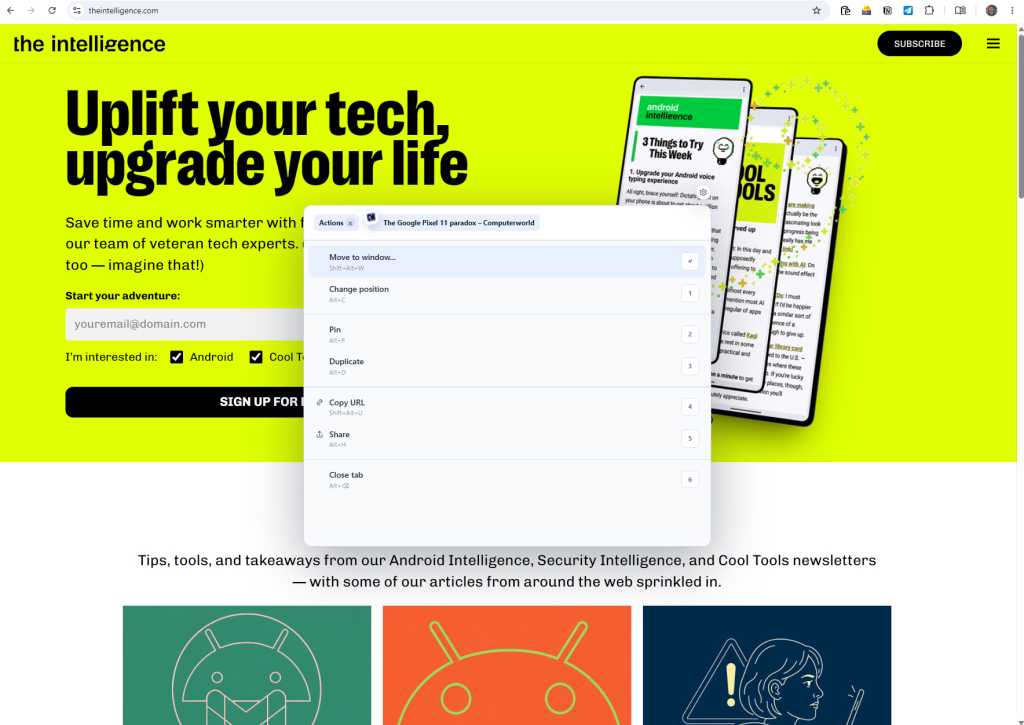
Tab-da is a browser extension designed to eliminate the "mouse-heavy" workflow that defines modern web navigation. By injecting a command-line interface directly into the browser, it allows users to perform complex management tasks without ever reaching for a peripheral.

The extension focuses on three primary pillars of productivity:
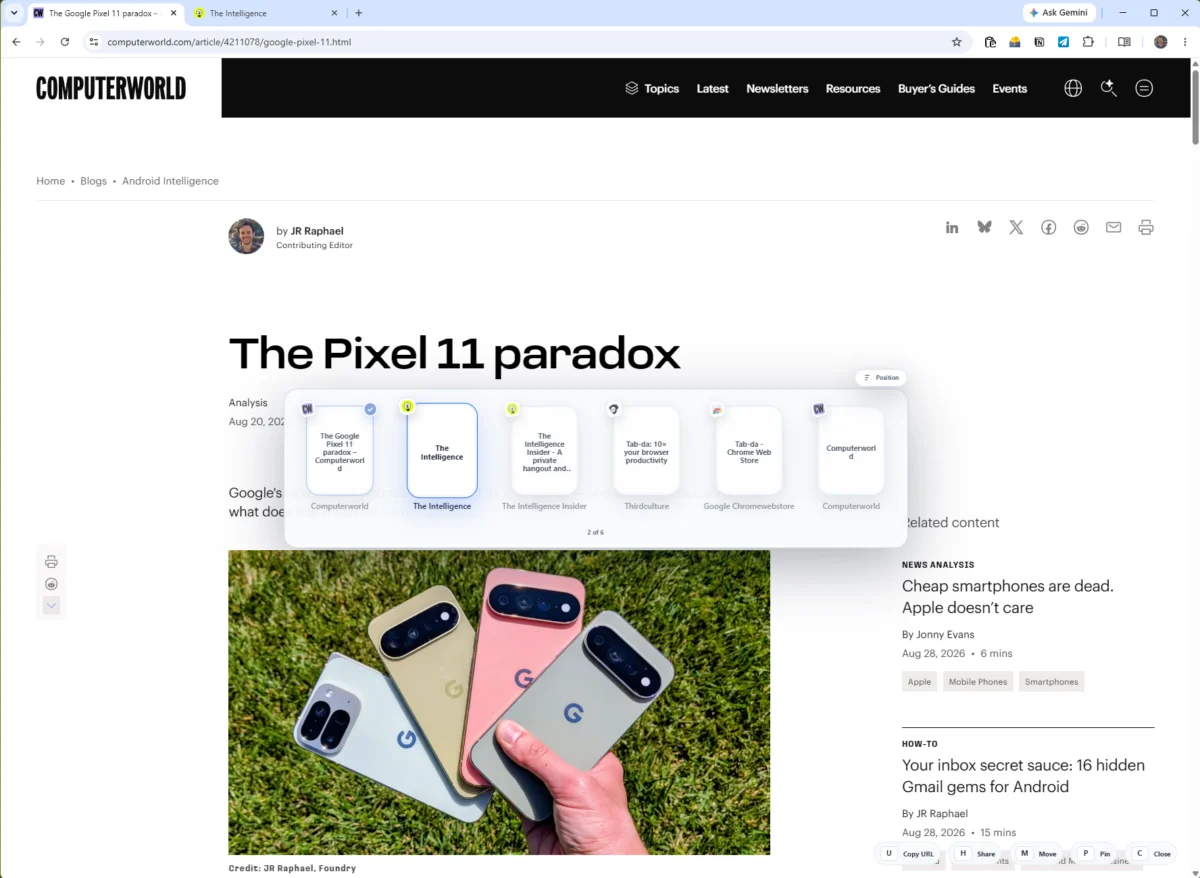
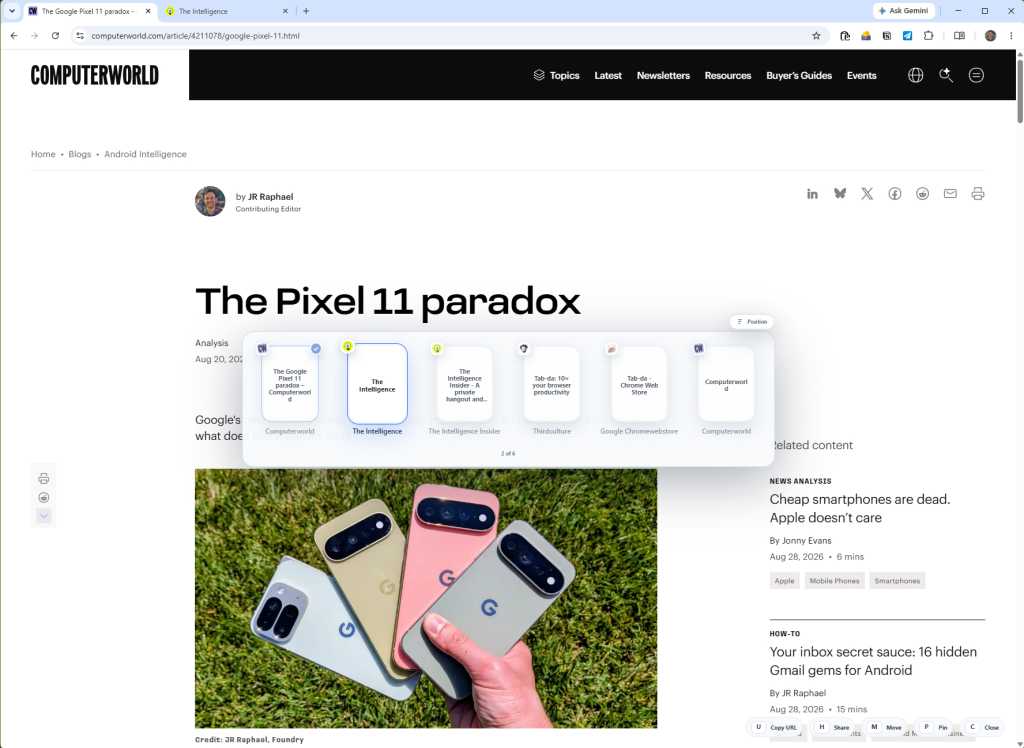
- The Tab Switcher: A high-speed, OS-level navigation tool that allows users to cycle through open tabs with a simple keyboard chord (Ctrl+Shift+Arrow), mimicking the functionality of
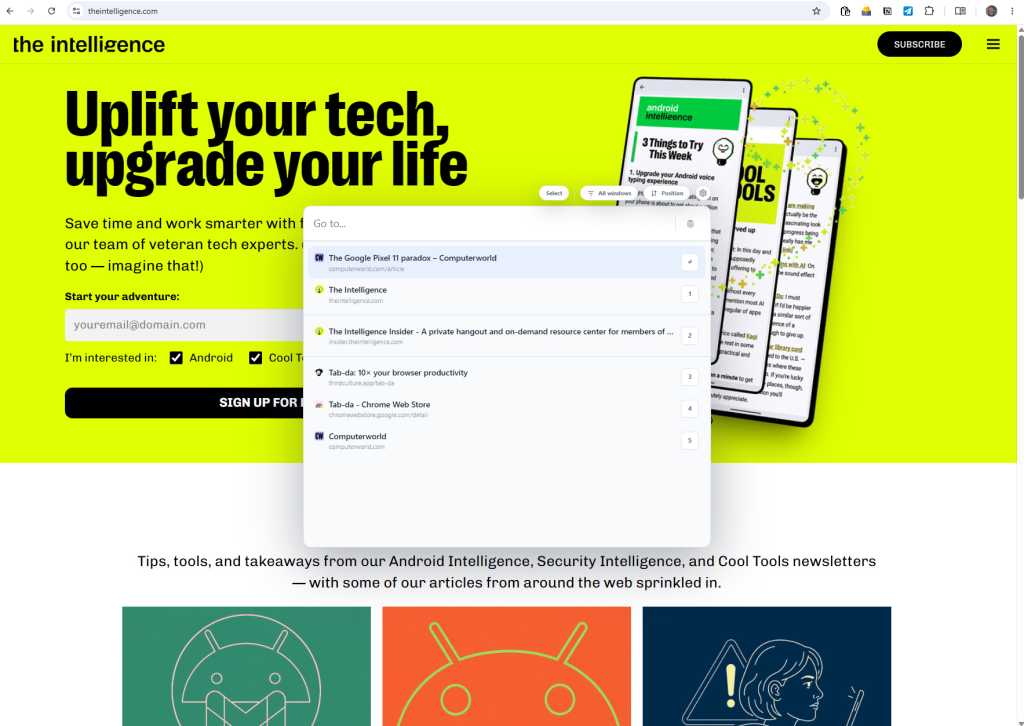
Alt+Tabin Windows. - The Command Bar: A universal search and action console summoned via
Ctrl+Shift+Space. This acts as a centralized brain for the browser, enabling users to jump between websites, trigger specific actions, or search through active sessions. - Custom Shortcut Engine: A robust framework that allows users to create personalized keyboard triggers for specific URLs or "workspace bundles," which can launch multiple related websites simultaneously with a single command.
Chronology of Browser Navigation
The history of browser navigation is largely a story of stagnation. In the mid-1990s, the browser was a secondary application. By 2010, the "tabbed" interface became the industry standard, yet the underlying method of interacting with those tabs—clicking with a mouse or using rudimentary Ctrl+Tab cycling—remained largely static.
- 1994–2005: The rise of tabbed browsing (pioneered by Opera and later Mozilla) revolutionized how we organized information, but navigation remained tactile and visual.
- 2008–2020: The dominance of Chrome solidified the "browser as an OS" paradigm. However, UI development focused primarily on aesthetics and cloud synchronization rather than power-user ergonomics.
- 2023–2025: The "AI Pivot." Browsers began prioritizing generative AI integrations. While useful for drafting, these tools often ignore the latency issues caused by "tab bloat"—the phenomenon where users accumulate dozens of tabs, making navigation cumbersome.
- 2026 (The Current Moment): The release of tools like Tab-da marks a counter-movement. Developers are recognizing that "productivity" is not just about having an AI write a paragraph, but about reducing the "click-cost" of everyday workflows.
Supporting Data: The Case for Keyboard Efficiency
The argument for keyboard-centric navigation is rooted in the concept of "context switching." Research in cognitive ergonomics suggests that the physical movement required to transition from the keyboard to a mouse forces the brain to shift focus, momentarily breaking the "flow state."
A user managing a typical professional workflow—checking email, updating a project management tool like Trello, and referencing a Google Doc—might perform hundreds of clicks per hour. By implementing a tool like Tab-da, a power user can theoretically:
- Reduce Navigation Time: Moving between tabs via a search-based command bar is consistently faster than scanning a horizontal strip of miniature icons, especially when the user has more than 15 tabs open.
- Minimize "Tab Clutter": The psychological toll of visual clutter in the tab bar is well-documented; by hiding the tab bar and relying on keyboard commands, users report reduced cognitive load.
- Standardize Workflows: Custom shortcuts allow users to "save" their mental state. Instead of opening four separate apps manually every morning, a user can assign a single shortcut to open a "Deep Work" suite.
The Developer’s Philosophy: Privacy and Performance
In an era where browser extensions are frequently scrutinized for data harvesting and privacy violations, Bardi Golriz has taken a transparent approach. Tab-da functions entirely on the client side. There is no cloud-based syncing of browser history, and the extension does not track user behavior.
"The goal is to provide a utility, not a service," Golriz has noted. This commitment to privacy is a significant selling point for enterprise users and professionals working with sensitive data. By keeping all data local, Tab-da circumvents the common security concerns associated with browser-based productivity suites that rely on third-party servers to "learn" user habits.
Implications for the Future of Work
The emergence of tools like Tab-da has significant implications for how we define "productivity software" in the coming years.
The Decline of the "Mouse-First" Era
For decades, interface design has prioritized "discoverability"—making things easy for novices to find via icons and menus. However, there is a growing segment of the workforce that prefers "efficiency over discoverability." This "keyboard-first" approach is already common in software development (via tools like VS Code or terminal-based workflows) and is now bleeding into the general knowledge-worker population.
Browser Agnosticism
Because Tab-da is built for the Chromium engine, it highlights a broader trend: the consolidation of the web ecosystem. As Microsoft Edge, Vivaldi, Brave, and Chrome all share the same underlying architecture, developers can build powerful, universal tools that work regardless of the user’s browser of choice. This fosters a healthier competitive environment where browsers compete on features and performance rather than proprietary walled gardens.
The Rise of the "Micro-SaaS"
Tab-da is priced at a modest 99 cents per month, or a $20 lifetime license. This business model—the "Micro-SaaS"—is a departure from the enterprise-level subscription models of big tech. It suggests that users are increasingly willing to pay small, independent developers for tools that provide immediate, tangible improvements to their daily digital lives, rather than relying solely on bloated, all-in-one software suites.
Conclusion: Starting Your Own Command-Center Transition
Adopting a keyboard-heavy workflow requires a period of adjustment. Muscle memory is not built overnight. The most successful users of Tab-da start small:
- Phase One (Week 1): Practice using
Ctrl+Shift+Arrowto switch between tabs instead of clicking. - Phase Two (Week 2): Integrate the Command Bar (
Ctrl+Shift+Space) to jump to your most frequently used websites. - Phase Three (Week 3): Begin creating custom shortcuts for your most complex workflows.
The "browser-as-an-OS" paradigm is here to stay, but the tools we use to navigate it are finally catching up to the speed at which we work. By reclaiming control of the browser through keyboard shortcuts, users can move past the limitations of visual navigation and enter a state of high-velocity productivity. In the digital age, seconds saved on navigation compound into hours gained over a year—making the transition to keyboard-centric work not just a preference, but a professional necessity.