On April 17, 2026, the technology landscape shifted in a way that market analysts were quick to quantify. Within hours of Anthropic announcing "Claude Design," Figma’s stock plummeted by approximately 7%. The market, often sensitive to the displacement of incumbent workflows, also noted the abrupt departure of Figma board member Mike Krieger just three days prior. While these financial tremors provide a compelling narrative of industry disruption, they tell us very little about the actual utility of the tool.
For the average professional—be they a designer, product manager, or developer—the central question remains: How does one move beyond the initial marketing gloss and integrate Claude Design into a productive workflow? This article explores the mechanics, strategic implementation, and professional implications of Anthropic’s latest research preview.
1. The Core Architecture: What is Claude Design?
Claude Design is not a generative art tool, nor is it a simple drag-and-drop website builder. It is a research-grade interface powered by Claude Opus 4.7’s sophisticated vision capabilities. Available via claude.ai/design for Pro, Team, and Enterprise users, it represents a fundamental departure from the static image generators that dominated the early AI design wave.
The Code-First Paradigm
The most critical distinction for any user to grasp is that Claude Design does not produce pixels; it produces code. When you ask the system to build a landing page, an interactive prototype, or a slide deck, you are not receiving a flat raster image. You are receiving rendered, functional HTML, CSS, and JavaScript.
This architectural choice is the engine behind its versatility. Because the output is a web-native document, it supports embedded video, dynamic voice input, 3D elements, and real-time navigation. It does not mimic a design tool; it functions as a design partner that speaks the language of the browser. By treating code as the universal medium, Anthropic has bridged the gap between ideation and functional implementation.
2. Chronology of a Disruption
To understand the weight of this release, one must look at the timeline leading up to the public preview:

- April 14, 2026: Mike Krieger, a pivotal figure in the design-tech ecosystem, steps down from the Figma Board of Directors.
- April 17, 2026: Anthropic Labs officially launches the Claude Design research preview.
- April 17, 2026 (Afternoon): Market reaction results in a 7% decline in Figma’s share price, reflecting investor anxiety regarding the potential commoditization of UI/UX design.
- Post-Launch: Early adopters begin integrating the tool into Agile development workflows, testing its ability to generate prototypes that bypass the traditional "design-to-code" handoff friction.
3. Getting Started: The First Project Lifecycle
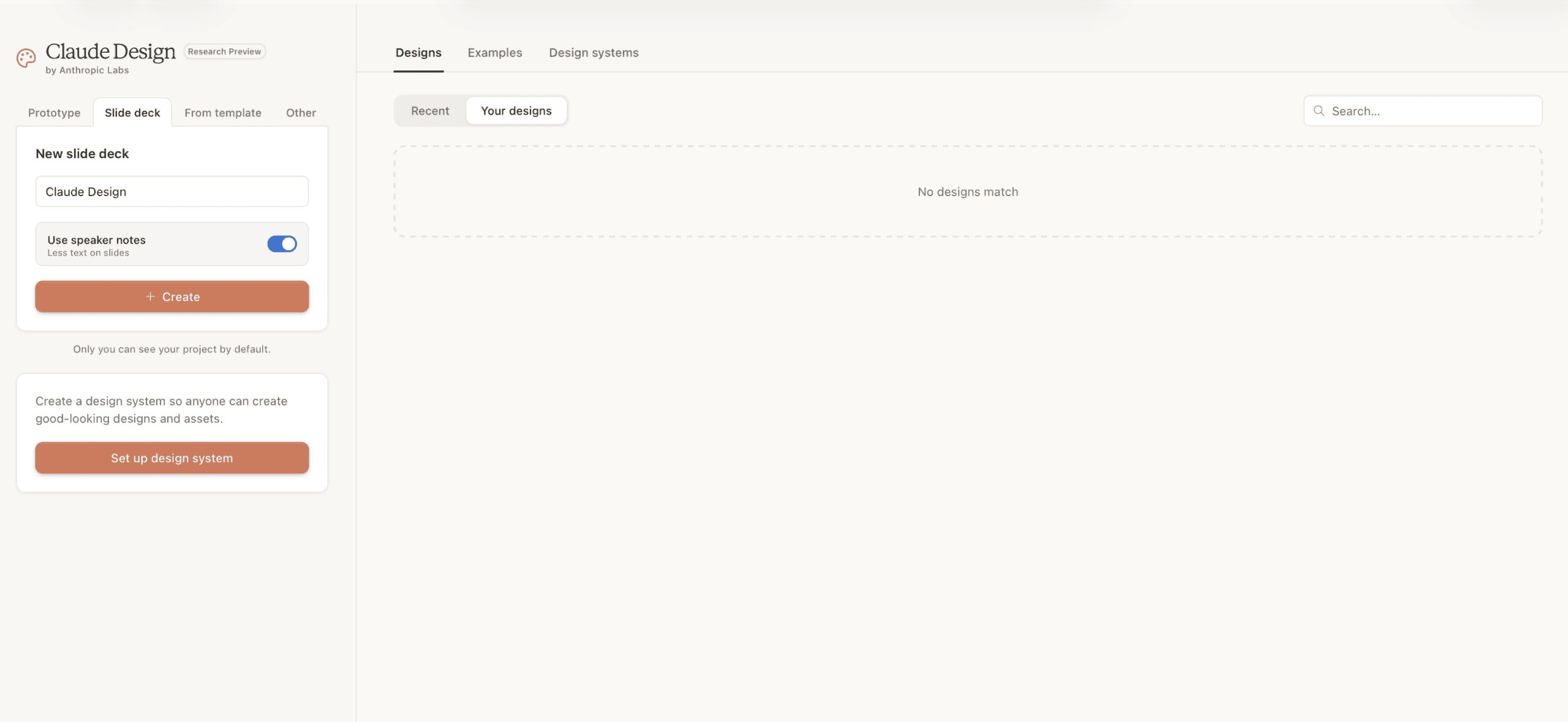
When a user initiates a session in Claude Design, they are presented with four primary paths: Prototype, Slide Deck, From Template, and Other.
The interface design, characterized by a chat panel situated beside a live, responsive canvas, mirrors the interaction patterns found in Claude Code. However, the most important aspect of this interface is the "Plan Mode." Claude Design rarely executes a request immediately. It mimics the behavior of a senior developer or designer by asking clarifying questions about audience, brand tone, and functional requirements.
Avoiding the "Generic Trap"
The most common mistake for beginners is the use of vague, one-line prompts. A request for "a sleek dashboard for a fintech company" will inevitably yield a generic, uninspired template. The true power of the tool is unlocked through context. By providing specific details—the target user persona, the primary conversion goal, and the desired layout constraints—the AI shifts from producing a generic asset to building a bespoke interface.
4. The Design System: The Strategic Foundation
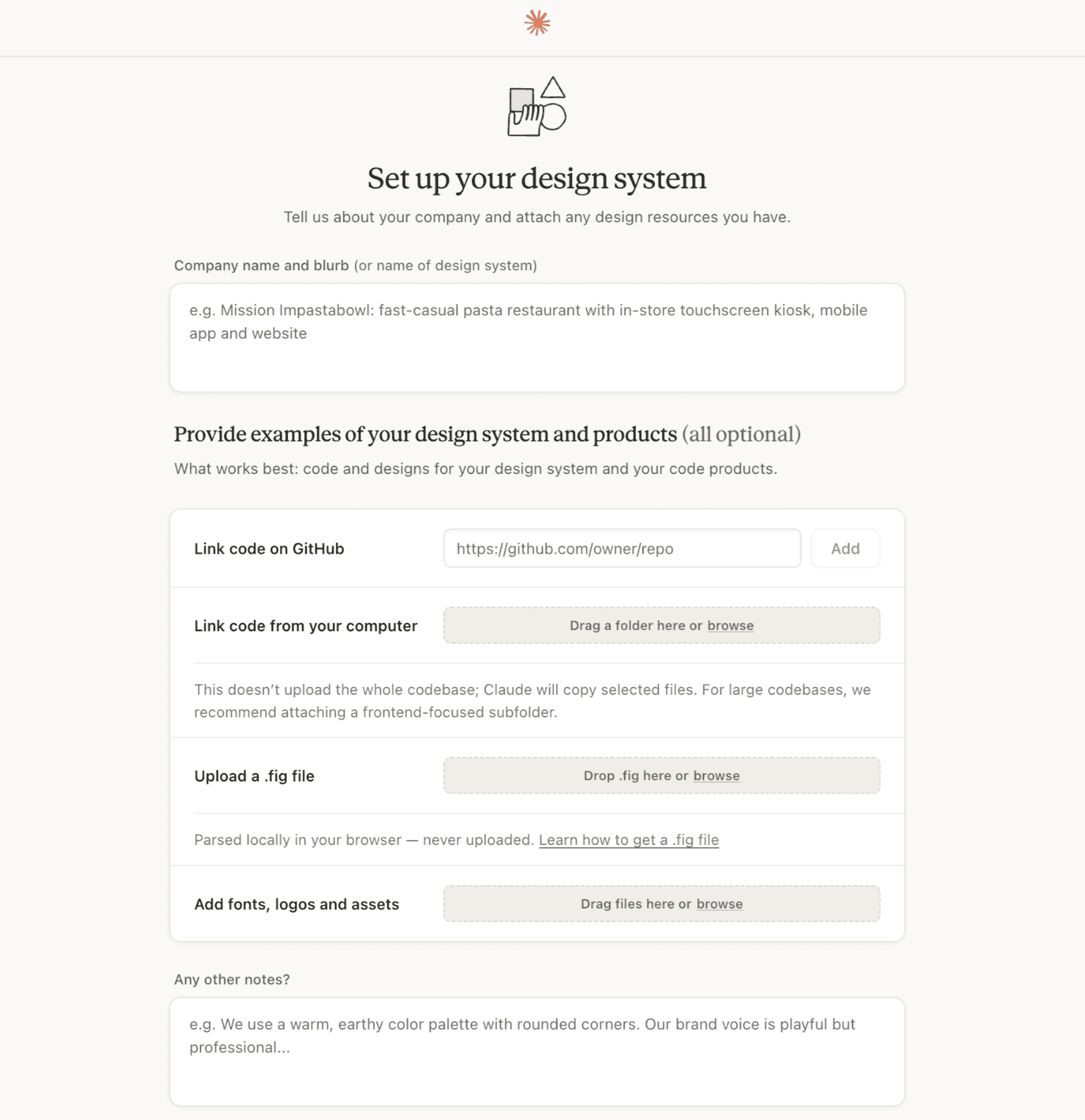
If you skip the setup of a design system, you are not using Claude Design to its full potential. The design system acts as the "North Star" for the AI, ensuring that every project inherits your brand identity rather than the default "AI-aesthetic."
Implementing a Coherent System
For teams, this is the most critical step. A two-step workflow is highly recommended:
- Consolidation: Use "Claude Cowork" to synthesize fragmented brand assets, logos, typography, and color palettes from existing, scattered documentation.
- Publication: Feed this organized data into the Claude Design system manager.
Once published, these components become the AI’s primary vocabulary. Instead of instructing the tool to "make the button blue," you can command it to "use the Primary CTA style from the design system." This creates a feedback loop of consistency that is impossible to achieve with manual prompting alone.
5. Comparative Analysis: Claude Design in the Ecosystem
Claude Design occupies a unique space, overlapping with several established categories without perfectly replacing any of them.
| Tool | Primary Utility | Collaboration | Output |
|---|---|---|---|
| Claude Design | Rapid prototyping & interactive drafts | Chat-driven, org-wide systems | Functional Code |
| Figma | Pixel-precise, high-fidelity design | Native multiplayer, branching | Vector files |
| Canva | Marketing & social media assets | Simple team sharing | Flattened graphics |
| Vibecoding (v0, etc.) | Direct app deployment | Code-review based | Full repo/deployment |
When to choose what:
- Use Claude Design when you need to move from a concept to a functional, interactive prototype within an hour. It is the bridge between a whiteboard session and a developer’s environment.
- Use Figma when your project requires granular, pixel-perfect control, complex animation states, or massive, multi-page design systems that require deep team collaboration.
- Use Canva for templated marketing collateral where speed and ease of use for non-designers outweigh the need for custom code or interactivity.
- Use "Vibecoding" tools if your final goal is a production-ready software application that requires continuous deployment and Git version control.
6. Advanced Workflow: Prompting and Iteration
To master Claude Design, one must refine the "four-part brief" pattern:

- The Goal: Define the success metric of the artifact.
- The Audience: Identify who will interact with the interface.
- The Content: Provide the non-negotiable data points.
- The Layout: Suggest the structure, while leaving room for the AI to optimize for usability.
When iterating, distinguish between the inline comment tool and the chat panel. Use inline comments for visual adjustments (e.g., "increase the margin on this specific card"). Use the chat panel for structural shifts (e.g., "restructure this page to follow a three-column layout for mobile responsiveness").
7. Limitations and Governance
Despite its capabilities, Claude Design is a research preview, and it comes with inherent trade-offs:
- Complexity Thresholds: While it excels at building UIs, it can struggle with highly complex, state-heavy logic that requires a deep understanding of external database architectures.
- Version Control: While it features a native history, it lacks the branching capabilities of Git. It is advisable to manually "Save Version" before attempting architectural changes.
- Accessibility: As a code-generator, it produces functional output, but it may occasionally miss nuanced ARIA labels or specific keyboard navigation requirements unless explicitly prompted.
8. Implications for the Future of Design
The release of Claude Design suggests that the role of the designer is evolving from "creator of static assets" to "architect of systems and prompts."

The industry is moving toward a future where the distinction between "design" and "code" continues to blur. By democratizing the creation of interactive, code-based interfaces, Anthropic is effectively shortening the time-to-market for ideas. For the professional, this is an opportunity. Those who master the art of maintaining a robust, AI-accessible design system will find themselves moving significantly faster than those tethered to legacy, manual-heavy workflows.
In conclusion, Claude Design is not a threat to the creative professional; it is an accelerant. By handling the rote execution of layouts and components, it allows designers to focus on what matters most: the user experience, the brand narrative, and the strategic problem-solving that AI cannot yet replicate. The tool is only as good as the design system and the clear, structured intent provided by the user. If you treat it as a partner rather than a magic wand, the potential for professional leverage is unprecedented.