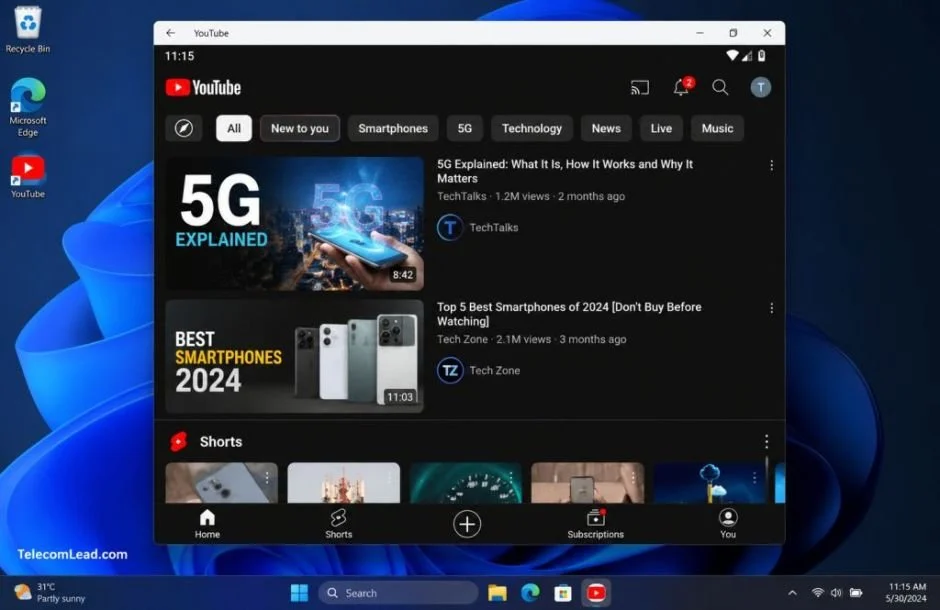
The landscape of video delivery has undergone a seismic shift, moving far beyond the traditional confines of cable headends, satellite transponders, and pre-negotiated programming schedules. Today, the ubiquitous applications found in the "Video Players and Editors" category are not merely supplementary tools but have become the very conduits through which consumers experience television. These applications treat the network not as a broadcaster, but as a versatile pipe, fundamentally altering the dynamics for telecom operators, content distributors, and even content creators themselves.
This evolution is particularly impactful for those within the telecommunications and content distribution sectors. The delivery layer is increasingly defined by the app, and critically, the app is becoming what subscribers increasingly perceive as television itself. This article will delve into this transformation, examining the core functionalities of these modern video delivery clients, their implications for industry stakeholders, and the practical considerations for professionals working within these fields.
H2: The Dual Nature of "Video Players and Editors" Apps
A cursory examination of any app store’s "Video Players and Editors" category reveals a bifurcation in the software presented. On one hand, there are traditional local media players, designed to simply open, decode, and display video files stored on a device, then gracefully exit. Their function is purely utilitarian, focused on the playback of existing content.
However, a far more significant and influential category of software within this label comprises "delivery clients." These are not standalone playback tools but sophisticated applications intrinsically linked to vast online services. They are powered by complex recommendation engines, draw from expansive, cloud-based content libraries, and offer a personalized viewing experience. It is this second type of application that commands the attention of network operators and content providers.
H3: The Delivery Client: The New Gatekeeper of the Subscriber Experience
For telecom and cable operators, the performance of these delivery clients is paramount. A subscriber’s perception of their multi-gigabit broadband connection is directly influenced by the efficiency of the video app. Smooth adaptive bitrate switching, crucial for maintaining playback quality on congested network nodes, is dictated by the app’s algorithms. Furthermore, the seamless transition of video sessions from a smartphone to a laptop, or to a television via casting, is entirely managed by the delivery client. These applications have effectively become the interface between the subscriber and the network’s capabilities, translating raw bandwidth into a tangible viewing experience.
The consolidation of features within these delivery clients is another key aspect of their growing influence. Functions that once required separate, dedicated software – such as uploading video content, basic editing, engaging in comment sections, and managing personalized playlists – are now integrated directly into the primary viewing application. This comprehensive feature set is a significant factor in why a single app can now credibly substitute for a traditional channel lineup, offering a personalized and dynamic alternative to scheduled programming.
H2: Deconstructing the YouTube App: A Microcosm of the Shift
The official YouTube app, developed and published by Google LLC, serves as an exemplary case study for understanding this paradigm shift. Its self-description highlights its role as a platform for discovering what the world is watching, encompassing everything from music videos and trending gaming content to entertainment and news. Crucially, it emphasizes its availability and functionality across a range of devices, particularly smartphones and tablets.
Beneath this straightforward summary lies a robust and multifaceted feature set. The app seamlessly integrates functionalities such as subscribing to channels, curating playlists, interacting through comments and shares, uploading and editing user-generated content, and casting playback to external displays. These features, once distributed across multiple applications, are now unified within the YouTube client. Navigation is designed for intuitive interaction, relying on simple icon taps and fluid swipes to move between recommended videos, subscription feeds, and personal account settings.
H3: The "Watch on Any Device" Imperative and Account-Level Continuity
From a distribution perspective, the app’s "watch on any device" promise is the most significant differentiator. This feature signifies a move away from device-centric consumption to an account-centric model. Session state, viewing history, and subscription preferences are no longer tethered to a specific piece of hardware but are instead associated with the user’s account. For anyone involved in modeling household video consumption patterns across broadband connections, this account-level continuity has become the primary unit of measurement, eclipsing the mere count of devices within a household.
The casting functionality, a cornerstone of the "watch on any device" experience, hinges on a critical technical prerequisite: both the client application and the target display device must reside on the same local network. This detail often proves to be a point of confusion for users, particularly when attempting to run mobile applications like YouTube on desktop operating systems, such as through emulators. If the emulator’s network configuration defaults to Network Address Translation (NAT) instead of a bridged network, casting targets will likely remain undiscoverable, leading to user frustration.
H2: Implications for Telecom and Cable Professionals
The impact of these app-centric delivery models extends far beyond the end-user experience, presenting profound implications for professionals in the telecom and cable industries. Three key aspects highlight this relevance:
H3: Redefining "Carriage" in the Age of Direct Distribution
The rise of platforms like YouTube has fundamentally altered the concept of "carriage." These applications act as direct broadcast endpoints for content creators and channels that have never engaged in traditional distribution deals with cable or satellite providers. This bypasses established gatekeepers, allowing content to reach audiences directly. For industry professionals, this means that "carriage" no longer solely refers to agreements with established broadcasters but also encompasses the reach and visibility offered by these app-based platforms. The ability for content to find an audience without traditional intermediaries necessitates a re-evaluation of content acquisition and distribution strategies.
H3: The Democratization of the Television Receiver
Casting support, a common feature in modern video delivery apps, transforms any commercially available screen – be it a smart TV or a connected display – into a television receiver. This innovation significantly diminishes the reliance on dedicated, proprietary set-top hardware. For telecom and cable operators, this has implications for hardware provisioning, maintenance, and the overall revenue models tied to set-top box rentals. The ubiquity of casting empowers consumers to leverage existing devices, shifting the focus from hardware sales to service delivery and the quality of the app experience.
H3: Lowering Barriers for Content Creation and Distribution
The integration of uploading and basic editing functionalities directly within these applications significantly lowers the barrier to entry for regional and community broadcasters. Historically, such operations would have required access to professional studios and specialized editing facilities. Now, individuals and smaller organizations can produce and distribute content directly to a global audience with minimal investment in infrastructure. This democratizes content creation, fostering a more diverse and vibrant media ecosystem, and presents new opportunities and challenges for content discovery and moderation for established players.
These observations are not speculative; they are direct consequences of the features inherent in these applications, viewed through the practical lens of network planning and content pipeline management. Understanding these functionalities is essential for professionals who are responsible for designing and maintaining the infrastructure that supports modern video consumption.
H2: Practical Applications: Running YouTube’s Android App on Windows
While a web browser offers a perfectly adequate and often preferred method for casual YouTube viewing, there are specific use cases that necessitate running the Android application on a Windows desktop. These scenarios often revolve around replicating the precise behavior and features of the mobile app, particularly for professional purposes. This includes evaluating the mobile layout, testing swipe-based navigation for recommended content and subscriptions, assessing the app-level casting stack, or conducting product testing for services that must coexist with YouTube’s mobile presence.
These use cases are particularly relevant for Quality Assurance (QA) engineers, support teams within telecom operators who handle "app buffering" tickets, and individuals documenting the mobile user experience while working on a desktop. The most common method for achieving this is through an Android emulator, with BlueStacks being a widely used option. Within the emulator’s environment, two critical settings significantly enhance the functionality and performance of the YouTube app:
H3: Bridged Networking for Seamless Casting Discovery
The network adapter mode of the virtual machine is crucial for enabling cast discovery. Setting the virtual machine to bridged networking rather than NAT is essential if the goal is to have the emulator discover TVs and streaming sticks connected to the local area network (LAN). When using NAT, the virtual machine operates on its own isolated network, preventing the YouTube app from detecting any cast targets. This results in the app displaying no castable devices and offering no helpful error messages, rendering the casting feature useless. Bridged networking, conversely, allows the virtual machine to appear as a distinct device on the physical network, facilitating seamless communication with other devices on the LAN, including casting receivers.
H3: Optimizing Graphics and Resolution for Smooth Playback
YouTube’s video player is heavily reliant on hardware decoding for optimal performance. To ensure smooth playback within an emulator, selecting the GPU-accelerated renderer is highly recommended. Additionally, setting the emulator’s resolution to match the host monitor’s native resolution is vital. When a phone-sized 1080p canvas is upscaled to a large desktop display, it can result in a soft, pixelated, and stuttery image. By matching the resolution, the app renders at its intended quality, and the display handles the scaling, preserving image clarity and playback fluidity.
Beyond these two critical settings, the YouTube app generally functions as expected within the emulator on modern hardware. Playback is smooth, keyboard input seamlessly maps to search functions, and the mouse cursor effectively emulates taps, which is particularly beneficial given that YouTube’s mobile interface was not designed around rapid, gesture-based interactions.
H3: Navigating Emulation Nuances: Picture-in-Picture and Background Playback
It is important to note that features like picture-in-picture (PiP) and background playback may behave differently within an emulator compared to their native phone environment. The host operating system’s window manager, rather than Android’s own system, dictates what happens when the user switches away from the emulator window. Therefore, if the workflow relies on audio continuing to play while working in other applications, thorough testing of this functionality within the emulator is strongly advised, rather than assuming it will automatically carry over from the mobile experience.
H2: The Professional’s Toolkit: Support, QA, and Content Teams
The desktop setup for running mobile video apps like YouTube is not intended for casual viewing. A browser tab accomplishes this purpose with equal or greater efficiency. The true value of this emulation setup lies in its utility for specific professional roles:
H3: Replicating Subscriber Issues for Effective Support
Support desks at Internet Service Providers (ISPs) can leverage this setup to accurately reproduce buffering complaints reported by subscribers. By running the exact app build that the customer is using on a desktop environment, support agents can gain firsthand insight into the issue, identify potential network or app-specific problems, and provide more effective solutions. This direct replication of the user experience is invaluable for diagnosing and resolving technical support tickets.
H3: Verifying Cross-Platform Integration for Developers
For developers, testing how their own services interact with YouTube’s casting functionality is crucial. By running the Android app within an emulator, developers can meticulously check how their application hands off playback to YouTube casting, ensuring a seamless and integrated user experience. This is particularly important for applications that offer companion functionalities or integrate with the YouTube ecosystem.
H3: Content Review through the Audience’s Lens
Content teams benefit from reviewing uploaded videos through the same mobile interface their audience uses. This provides an authentic perspective on how content is presented, perceived, and interacted with on mobile devices. Understanding the nuances of the mobile app’s presentation, including its recommendation algorithms and playback controls, is essential for optimizing content for maximum reach and engagement.
In essence, the ability to run mobile video delivery apps on a desktop environment transforms these applications from mere entertainment tools into powerful diagnostic and development resources. For professionals dedicated to ensuring the smooth delivery and optimal consumption of video content, this capability is not a luxury but a necessity, providing a deeper understanding of the user experience and the underlying technical infrastructure. For the vast majority of users, however, their smartphone remains the natural and most convenient home for these ever-evolving video delivery platforms.