The era of relying solely on massive, cloud-based AI providers is rapidly fading. As privacy concerns mount and the desire for low-latency, offline-capable generative AI grows, developers and hobbyists alike are turning their attention to local inference. Leading this charge is Ollama, a streamlined, powerful tool that has demystified the process of running Large Language Models (LLMs) on consumer hardware.
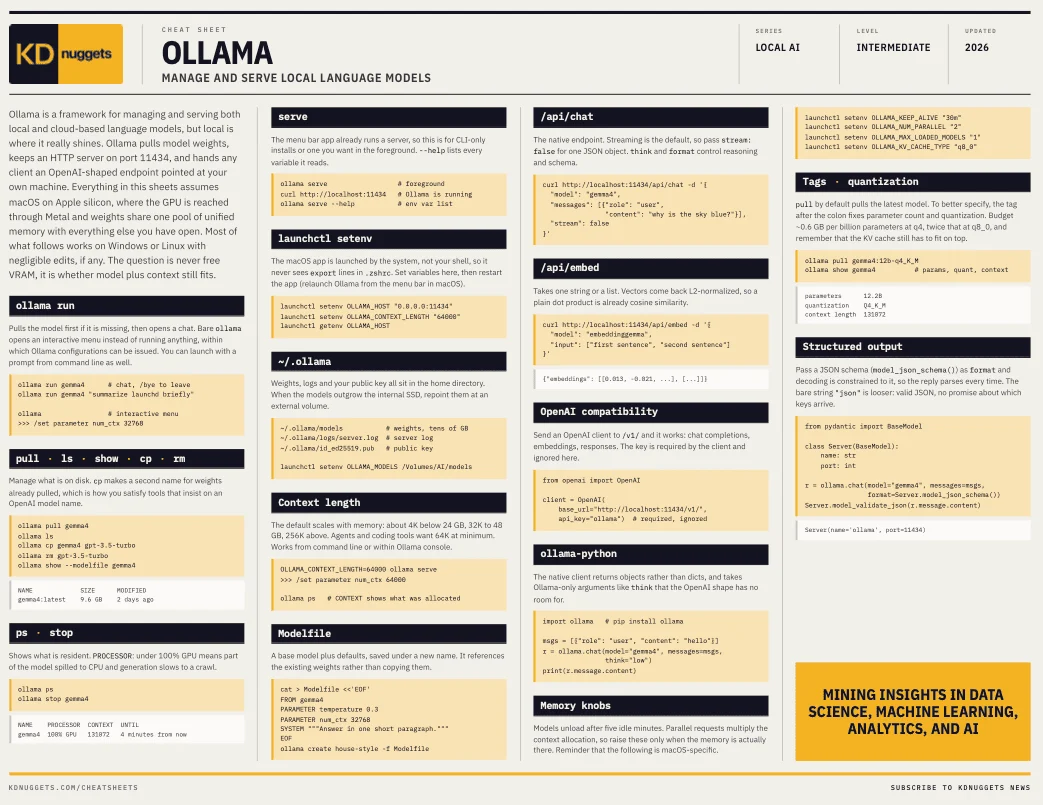
While the initial hurdle of “getting a model running” has been reduced to a single command-line instruction, the complexities of professional-grade model management have shifted toward optimization, resource allocation, and environmental configuration. To help navigate these technical nuances, KDnuggets has released a comprehensive new cheat sheet, serving as a roadmap for anyone looking to master the local LLM stack.
Main Facts: Simplifying the Local AI Stack
At its core, Ollama acts as a container-like manager for LLMs. It handles the retrieval of model weights, manages the lifecycle of the processes, and—crucially—exposes an OpenAI-compatible HTTP API on port 11434. This compatibility is a game-changer; it means that any application, library, or tool previously built for OpenAI’s GPT-4 or GPT-3.5 can be pointed at a local instance of Llama 3, Mistral, or Phi-3 with virtually no code changes.
The primary appeal of Ollama is its "batteries-included" approach. Users no longer need to worry about complex Python dependency hell or cryptic CUDA configurations. However, as the ecosystem matures, developers are encountering the "memory wall." Simply loading a model is easy; maintaining performance while balancing context windows and GPU utilization requires a deeper understanding of how Ollama interacts with the underlying hardware.
Chronology: From Experimental Research to Production Utility
The evolution of local LLMs has followed a rapid, aggressive timeline:
- 2022–Early 2023: The "Wild West" era. Running an LLM locally required significant expertise in PyTorch, manual quantization, and hardware-specific compilation.
- Late 2023: Ollama emerges as a user-friendly wrapper, abstracting away the complexity of llama.cpp. The barrier to entry drops from "expert researcher" to "terminal-literate enthusiast."
- Early 2024: The introduction of structured output capabilities and v1 API compatibility. This marks the transition of Ollama from a playground toy to a viable tool for building local RAG (Retrieval-Augmented Generation) pipelines.
- Present Day: The focus shifts to optimization. Users are now grappling with context management, environment variable persistence across OS sessions, and the fine-tuning of model parameters via Modelfiles.
Supporting Data: Managing Hardware and Context
One of the most frequent points of confusion for new users is the disparity between expected performance and actual output. The command ollama ps serves as the primary diagnostic tool.
The GPU Utilization Metric
The "PROCESSOR" column in the ollama ps output is a critical indicator of health. If your model shows anything less than 100% GPU utilization, it signifies that the model—or parts of it—have spilled over into system RAM (CPU). While this allows larger models to run on modest hardware, it results in a dramatic degradation of inference speed, often rendering the model unusable for real-time applications.
The Memory and Context Problem
Context window management is the silent performance killer. Users often assume that by loading a model, they have access to the full context length advertised by the provider. In reality, Ollama allocates memory based on the specific configuration of the instance. Understanding how to "defuse" these sizing decisions—and knowing how to adjust context limits to balance memory usage against recall performance—is essential for building stable applications.
Official Configuration Nuances: OS-Level Hurdles
A common frustration for macOS and Linux users involves environment variables. Because the Ollama desktop application is often launched by the system (via launchd on macOS or systemd on Linux) rather than the user’s shell, it does not inherit the standard environment variables defined in .zshrc or .bashrc.
If you have configured a custom OLLAMA_MODELS directory or adjusted the OLLAMA_KEEP_ALIVE variable in your terminal, the desktop app will remain oblivious to these settings. This leads to the "it looks right but doesn’t work" phenomenon. The solution requires setting environment variables at the system level. For macOS users, this involves using launchctl setenv to ensure the OS-level daemon respects your custom paths and performance limits.
Technical Implications: Structured Output and Reliability
In a professional development context, the "raw" output of an LLM is rarely sufficient. Applications often require deterministic data structures, such as JSON, for downstream processing.
JSON Schema Enforcement
Ollama has matured to support schema-constrained decoding. By passing a JSON schema within the format parameter, developers can force the model to adhere to a specific structure. This turns a stochastic, unpredictable text generator into a reliable API endpoint.
- The "json" flag: A loose, high-level request for valid JSON. Useful for casual tasks but prone to schema drift.
- Schema-constrained: Strict adherence to a provided blueprint. This is the gold standard for production-grade integrations where parsing failures could break a pipeline.
Implications for the Future of Local AI
The move toward local inference is not just about cost-cutting; it is about data sovereignty and operational resilience. When an application relies on a cloud-based API, it is subject to downtime, policy changes, and data privacy concerns. By mastering the nuances of Ollama—including API management, Modelfiles for pre-configuring defaults, and disk-management strategies—developers are effectively building an "AI-in-a-box" architecture.
The Role of Modelfiles
The Modelfile is perhaps the most underrated feature in the Ollama ecosystem. It allows for the creation of immutable, versioned model definitions. By embedding system prompts, temperature settings, and custom stop sequences into a Modelfile, you effectively create a "productized" version of an open-weights model. This reproducibility is what allows local LLMs to move from a developer’s laptop to a server-side deployment in a corporate environment.
Conclusion: The Path Forward
The "interesting problems" in AI have moved. It is no longer about whether you can run a model; it is about how you maintain it, how you optimize its footprint, and how you integrate it into a larger software architecture.
As we look toward the remainder of the year, the combination of efficient local hardware and robust tools like Ollama will likely dictate the next wave of AI innovation. The ability to switch between base models, experiment with different quantization levels, and manage complex context windows will distinguish the "AI tinkerers" from the "AI architects."
For those ready to bridge the gap between experimentation and deployment, the KDnuggets Ollama Cheat Sheet serves as the essential companion. From the intricacies of the /v1/ compatibility layer to the subtle nuances of environment variable management, this resource provides the technical clarity needed to master the local landscape.
Download the cheat sheet today, audit your current configurations, and start building applications that are faster, safer, and entirely within your own control. The future of AI isn’t just in the cloud—it’s right on your machine.