In the rapidly evolving landscape of mobile technology, the smallest features often provide the most profound impact on daily productivity. Google’s recent release of the Pixel 11 series introduced a subtle yet significant quality-of-life improvement: a native settings menu that allows users to assign distinctive vibration patterns to specific types of alerts. This feature enables users to distinguish between an urgent work call, a personal text, or a notification from a persistent acquaintance—all without ever glancing at their screen.
However, this "buzzworthy" innovation is currently exclusive to the Pixel 11 hardware. For the vast majority of the global Android user base, this level of haptic granularity remains out of reach. Yet, in the spirit of the open-source ethos that defines the Android ecosystem, this limitation is merely a temporary hurdle. By leveraging third-party automation tools, users can replicate—and even surpass—the Pixel 11’s capabilities on virtually any Android device, regardless of its age or manufacturer.
The Evolution of Haptic Intelligence
The Mechanics of Modern Notifications
For years, mobile notification systems were binary: a phone either vibrated or it didn’t. While "Do Not Disturb" modes and notification channels provided some control, the haptic feedback remained uniform. The Pixel 11’s introduction of customizable vibration patterns represents a shift toward "Haptic Intelligence." By utilizing the phone’s vibration motor as a tactile language, Google is allowing users to prioritize their digital attention based on the "feel" of the alert rather than the visual demand of a screen.

The Current Market Limitation
As of the current product cycle, this feature is baked into the proprietary firmware of the Pixel 11. While Google has a history of porting features to older models through "Feature Drops," there is no public roadmap detailing when or if this specific capability will reach the broader Android ecosystem. This creates a fragmentation of user experience, where the most intuitive features are gated behind the latest hardware upgrades.
Bridging the Gap: A Technical Workaround
The solution to this disparity lies in a powerful, often overlooked category of software: Android notification filters. Specifically, an application known as BuzzKill serves as the bridge between the average Android device and the high-end haptic customization of the Pixel 11.
Why BuzzKill?
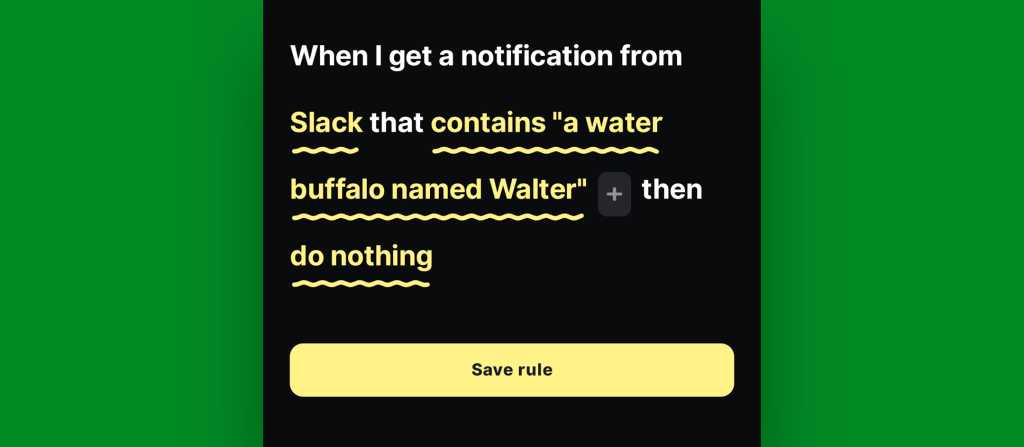
Unlike standard notification settings that apply blanket rules to an entire app, BuzzKill functions as a sophisticated logic engine. It allows users to set "if-this-then-that" (IFTTT) parameters for every incoming alert. By treating notifications like incoming email filters, users can define specific triggers—such as a specific sender, a keyword in the subject line, or a particular time of day—to execute a custom haptic pattern.

Chronology of Implementation
To achieve "Pixel-level" haptic customization, users can follow this streamlined, four-minute workflow:
- Define the Trigger: Identify the application (e.g., Slack, Messages, or Gmail) and the specific condition (e.g., a message from a specific contact or containing a specific keyword).
- Configure the Action: Instead of selecting the default system alert, the user selects the "Custom Alert" function.
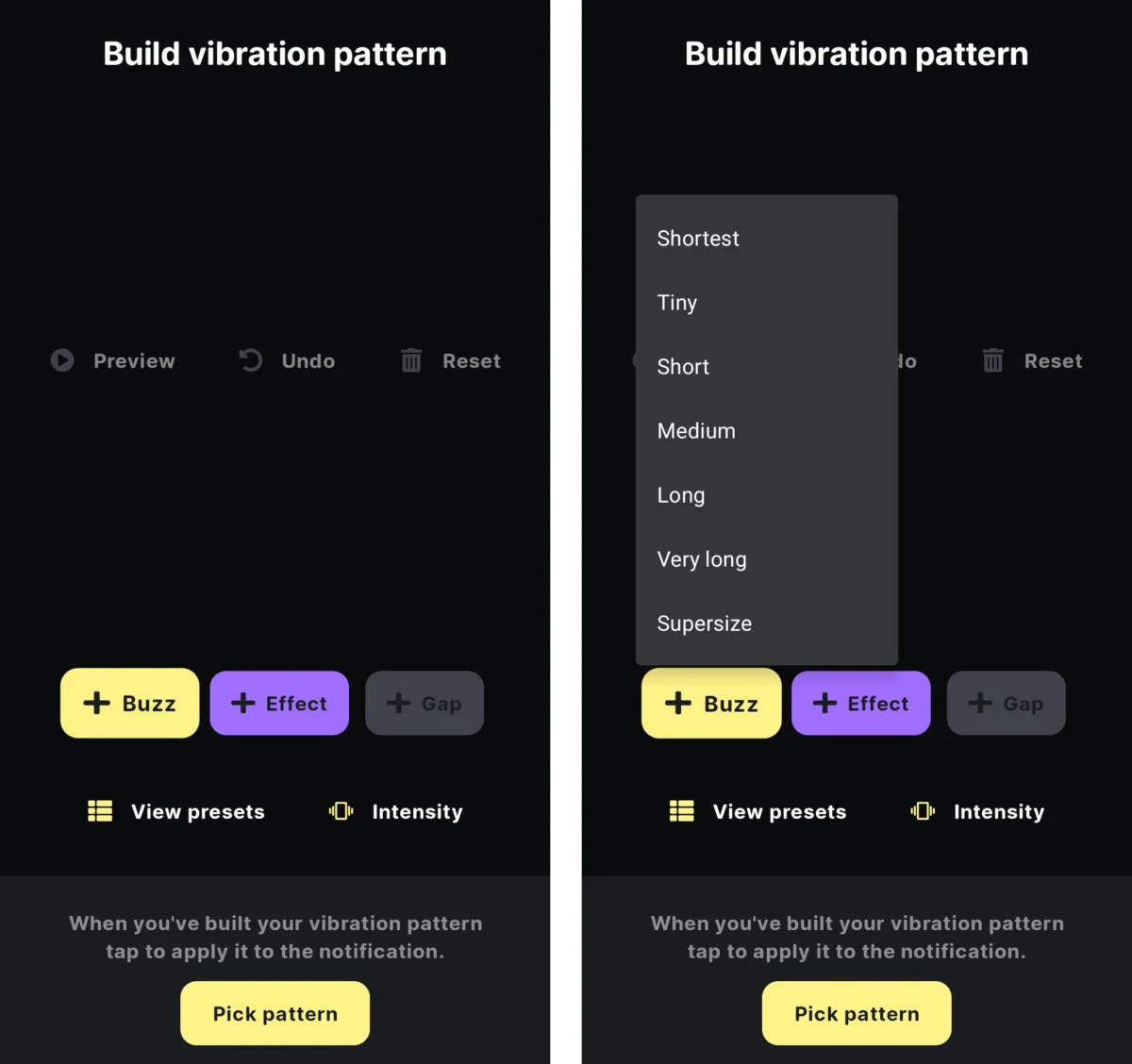
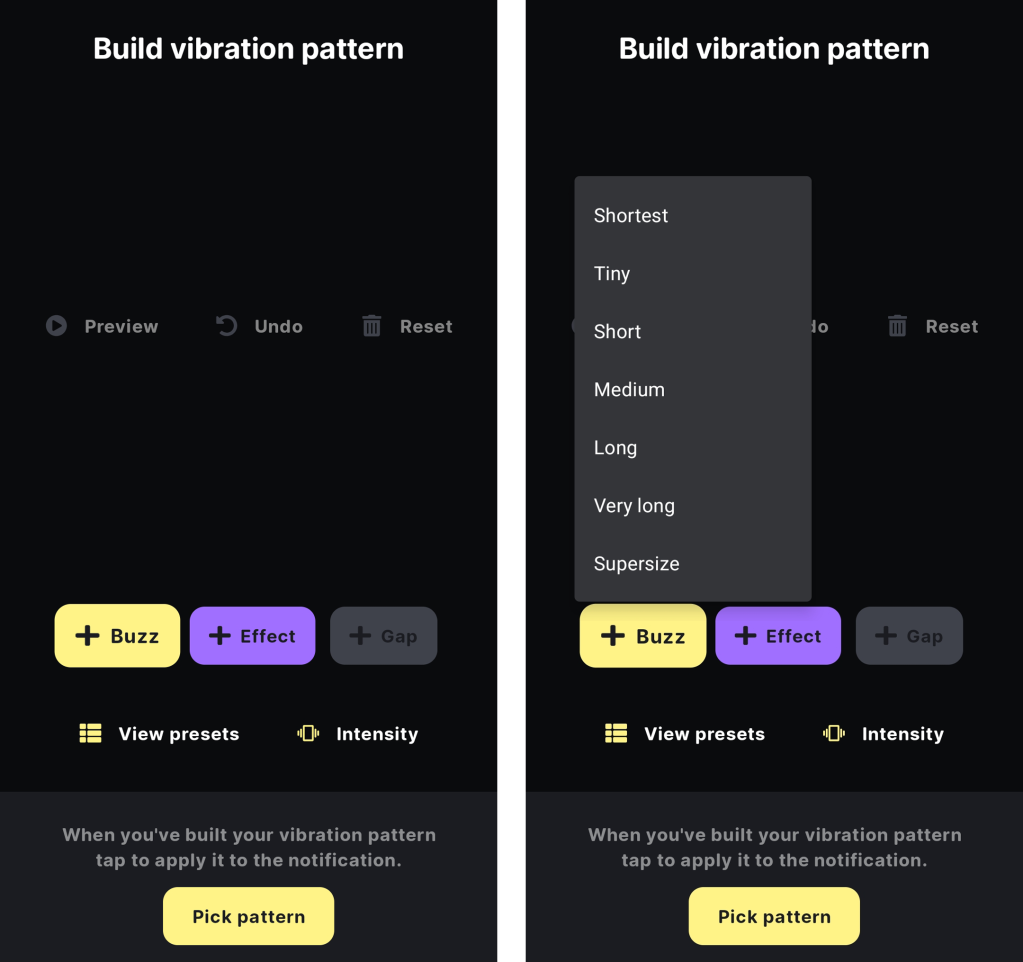
- Design the Haptic Language: Utilize the app’s internal editor to sequence pulse duration, gap timing, and intensity.
- Verification: Use the built-in preview tool to ensure the vibration pattern is sufficiently distinct to be recognized in a pocket or on a desk.
Supporting Data and User Benefits
Reducing "Notification Fatigue"
Studies on digital wellness suggest that the constant "pinging" of smartphones contributes to heightened anxiety and decreased focus. The ability to filter notifications through haptic feedback provides a form of "tactile triage." If a user knows that a specific, sharp, two-pulse vibration is a high-priority work request, they can immediately address it. Conversely, if a pattern is soft and intermittent, they know it is a low-priority social update that can wait until the end of the workday.
Comparative Customization
While the Pixel 11 offers a set of presets—such as "Heartbeat," "Bumps," and "Swirl"—the use of third-party tools like BuzzKill allows for an infinite variety of patterns. Users can design vibrations that mimic musical rhythms or complex, non-repeating pulses, offering a level of personalization that far exceeds the standard manufacturer presets.

The Developer Perspective: Why Customization Matters
When asked about the necessity of such features, industry experts emphasize that the future of UI/UX is "invisible." The goal is to provide the user with the maximum amount of information with the minimum amount of screen interaction.
Official Ecosystem Responses
While Google has not provided an official comment on third-party workarounds for their new features, the company’s ongoing support for the "Android Enterprise" ecosystem suggests an awareness that power users demand control. The open nature of the Android notification listener service is exactly what allows apps like BuzzKill to function, effectively proving that the "fragmentation" often criticized in Android is actually its greatest strength: the ability for users to customize their environment to their exact specifications.
Implications for the Future of Mobile Hardware
The existence of these workarounds carries three major implications for the mobile industry:
- Hardware vs. Software Parity: As software-defined features become more advanced, the gap between "budget" devices and "flagship" devices narrows. If a four-year-old phone can perform the same haptic functions as a brand-new Pixel 11, manufacturers must find new ways to justify premium pricing.
- The Rise of Contextual Computing: We are moving toward a mobile era where the device understands the context of the user. In the future, we may see AI-driven vibration patterns that automatically adjust based on the user’s GPS location, calendar events, or even biometric stress levels.
- Accessibility Innovations: Beyond convenience, custom vibrations are a massive win for accessibility. For users with visual impairments, the ability to assign unique, identifiable haptic patterns to different contacts or apps is not just a "neat trick"—it is a critical tool for navigating the digital world independently.
Conclusion: Take Control of Your Haptics
The Pixel 11 may have popularized the concept of custom vibrations, but the true power of the Android platform lies in the user’s ability to transcend manufacturer-imposed limitations. Whether you are using the latest hardware or a device that has seen several years of service, the tools to master your notification environment are available today.
By moving beyond the default "buzz" and creating a personalized language of haptic feedback, users can reclaim their focus and reduce the friction of constant connectivity. It is a simple, four-minute tweak that, in the long run, changes the way we interact with our most personal devices.
As the mobile landscape continues to evolve, remember that the most "buzzworthy" features aren’t always the ones included in the keynote presentation—they are the ones you build for yourself. For those interested in further optimizing their experience, exploring advanced notification filters is the next logical step in the journey toward true digital efficiency.
To learn more about optimizing your Android experience, including advanced notification management and system-level tweaks, explore our curated resources on Android Intelligence.