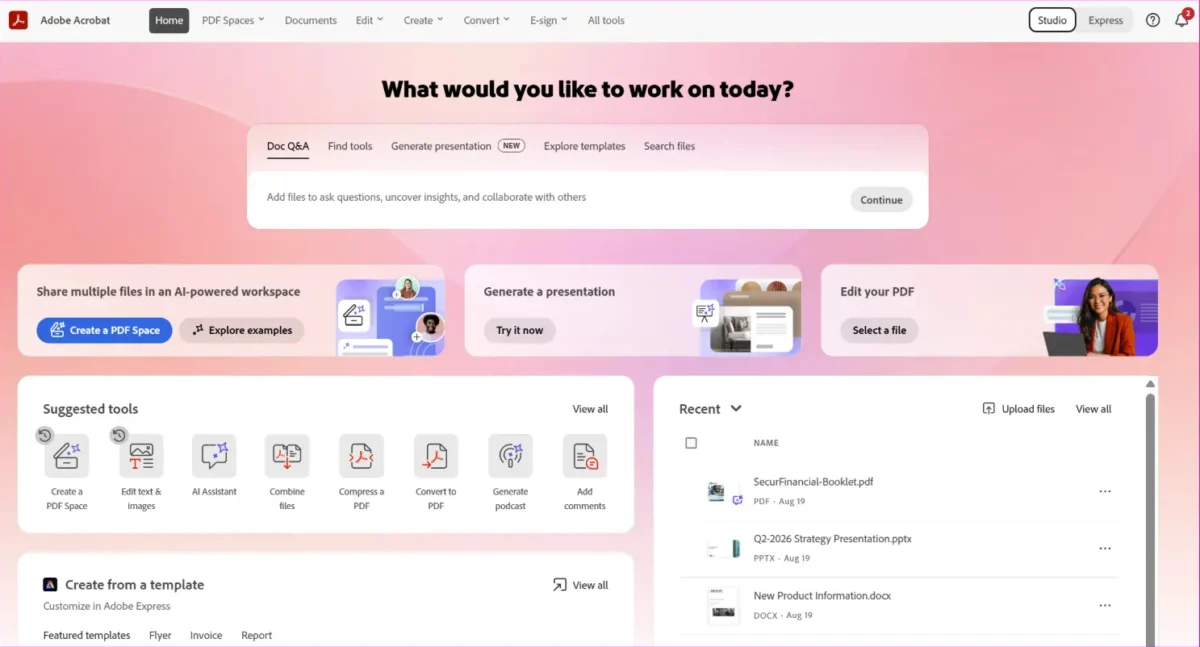
Adobe is signaling a paradigm shift for its flagship Acrobat software, moving the platform far beyond its traditional role as a tool for viewing and editing static PDFs. With a suite of new generative AI capabilities, Adobe is reimagining Acrobat as an "AI-powered document productivity and creativity platform." This transformation aims to unlock the vast, often dormant data trapped within enterprise documents, turning text-heavy files into interactive, actionable assets.
Main Facts: A New Era for Acrobat
The latest updates to Adobe’s Acrobat ecosystem represent a strategic move to capitalize on the generative AI boom. By integrating sophisticated AI assistants directly into the workflow, Adobe is enabling users to interact with their documents in unprecedented ways.
Key features introduced in this rollout include:
- Generative Visualization: Acrobat’s AI assistant can now ingest dense PDF content to generate interactive charts, infographics, and professional-grade presentation slides. The AI analyzes the user’s intent to determine the best visual representation of the data.
- Audio Summarization: Mirroring features seen in Google’s NotebookLLM and Microsoft’s Copilot, Acrobat can now synthesize documents and web links into podcast-style audio summaries, catering to users who prefer auditory information intake.
- Stylize Feature: This tool uses AI to transform plain, unformatted documents into polished, professional assets such as invoices or CVs, applying sophisticated templates automatically.
- Acrobat Knowledge Base: A sophisticated integration that connects the AI assistant to external repositories like Microsoft SharePoint and Google Drive, allowing users to query information across a broad spectrum of files.
- Analyzer Tool: A high-level data extraction engine designed to process large volumes of documents—such as thousands of contracts—to identify specific metadata like renewal dates, financial clauses, and compliance triggers.
Chronology of Development
Adobe’s journey toward an AI-centric document model has been iterative. The company began by embedding basic AI search functionality into Acrobat to help users navigate long files. However, the current release marks a pivot from "reading" to "creating."
- Phase 1 (Foundations): Initial integration of Adobe Sensei, the company’s underlying AI framework, focused on OCR (Optical Character Recognition) and basic text search improvements.
- Phase 2 (The AI Assistant): Adobe launched the Acrobat AI Assistant, enabling natural language querying of PDF documents. This set the stage for users to ask, "Summarize this contract" rather than manually scrolling through pages.
- Phase 3 (Enterprise Integration): The introduction of the "Knowledge Base" and "Analyzer" marks the current phase, where Acrobat is being positioned as a connective tissue between disparate enterprise systems like Slack, Teams, and cloud storage providers.
Supporting Data and Technical Architecture
The efficacy of these new tools relies on a complex backend infrastructure that balances generative capabilities with data governance.
The Knowledge Base Model
The Knowledge Base is designed to act as a centralized intelligence hub. By enabling queries from platforms like Slack and Microsoft Teams, Adobe is attempting to bring the document workflow into the user’s daily communication flow.
However, this comes with a rigorous credit-based consumption model. Adobe has implemented a "shared credit" system for enterprise users, where:
- Standard Users: Licensed individuals are capped at 1,000 queries per month.
- Transactional Consumption: Actions such as uploading files or performing cross-platform queries from Slack/Teams draw from a pool of "shared credits."
- Enterprise Scaling: Adobe has not publicly disclosed the cost of additional credits, creating a layer of uncertainty for organizations looking to scale these tools across thousands of employees.
The Analyzer Mechanism
The Analyzer tool is fundamentally different from the Knowledge Base. While the Knowledge Base is a search-and-retrieval product, the Analyzer is a data-processing product. It performs "attribute extraction," a process that historically required expensive manual labor or custom-built ETL (Extract, Transform, Load) pipelines. By automating the extraction of key terms from thousands of documents simultaneously, Adobe is positioning Acrobat as a contender for corporate data budgets, not just document-editing software budgets.
Official Responses and Strategic Vision
Abhigyan Modi, senior vice president for Adobe Document Cloud, emphasized the value of unlocking "trapped" data. In a company blog post, Modi noted, "Acrobat Knowledge Base transforms curated document collections—policies, playbooks, product information, pricing guidance, research—into cited answers available from Slack, Microsoft Teams, Acrobat, and other places employees already work."
For Adobe, the goal is to shift the perception of the PDF from a "dead" document format to a living repository of business intelligence. By integrating these tools into the software employees already use for their daily tasks, Adobe aims to reduce "context switching"—the productivity-draining habit of moving between applications to find information.

Implications for the Enterprise
The introduction of these features has prompted analysts to look closely at the long-term implications for corporate IT budgets and productivity workflows.
The "Data vs. Feature" Debate
Mike Leone, vice president and principal analyst at Moor Insights & Strategy, offers a nuanced perspective on the release. He suggests that the Analyzer tool is the more disruptive of the two releases.
"Knowledge Base is a search product, and search products get judged feature against feature," Leone said. "Analyzer is closer to a data product, because that extraction work is what companies currently pay people and pipelines to do."
Leone notes a critical bottleneck for enterprise adoption: the mobility of the data. If the insights generated by the Analyzer remain locked inside the Acrobat ecosystem, it remains a "good Acrobat feature." If, however, Adobe allows this extracted data to flow into a company’s primary data warehouse (like Snowflake or Databricks), it will begin to compete for larger, enterprise-wide data budgets.
The Risks of Credit-Based Pricing
The reliance on a credit-based model for enterprise features introduces significant management complexity. As Leone pointed out, headcount is a poor predictor of actual usage in AI tools.
"One person pointing it at 10,000 contracts will burn more credits than a hundred people asking the occasional question," Leone explained. "The issue for a broad deployment is that usage is rarely spread evenly."
This creates two primary risks for IT departments:
- Rationing: Employees may become hesitant to use the tool, fearing they will "exhaust the budget" for their team, thereby stifling the very productivity the tool is meant to encourage.
- Resource Hoarding: A small subset of power users could inadvertently consume the organization’s entire monthly credit allotment, leaving the rest of the company without access to essential AI services.
Strategic Recommendations for Organizations
For organizations considering the adoption of these new Acrobat features, the path forward requires careful planning:
- Centralized Credit Management: IT departments must treat these credits as a finite, shared resource, similar to cloud compute credits, and establish internal chargeback models if necessary.
- Data Governance Audits: Before connecting Acrobat to repositories like SharePoint or Google Drive, organizations must ensure their document permissions are airtight. AI assistants can inadvertently expose sensitive information to users if document-level security is not strictly enforced.
- Pilot Programs: Rather than a broad, immediate deployment, enterprises should identify specific use cases—such as the legal department’s contract review or procurement’s invoice auditing—to test the ROI of the Analyzer tool before rolling it out company-wide.
Conclusion: A Platform at a Crossroads
Adobe’s pivot is ambitious. By evolving Acrobat from a viewing tool into an AI-powered intelligence platform, the company is attempting to secure its relevance in an era where information retrieval is increasingly dominated by LLMs (Large Language Models).
The success of this transition will not just depend on the sophistication of the AI, but on the transparency and scalability of the pricing model. As businesses look to integrate AI into their workflows, the "hidden" costs of credit-based systems will become a key factor in their decision-making. Adobe has provided the tools to unlock the potential of the enterprise document; now, it remains to be seen whether organizations can effectively manage the costs and operational complexities that come with this new level of digital intelligence.