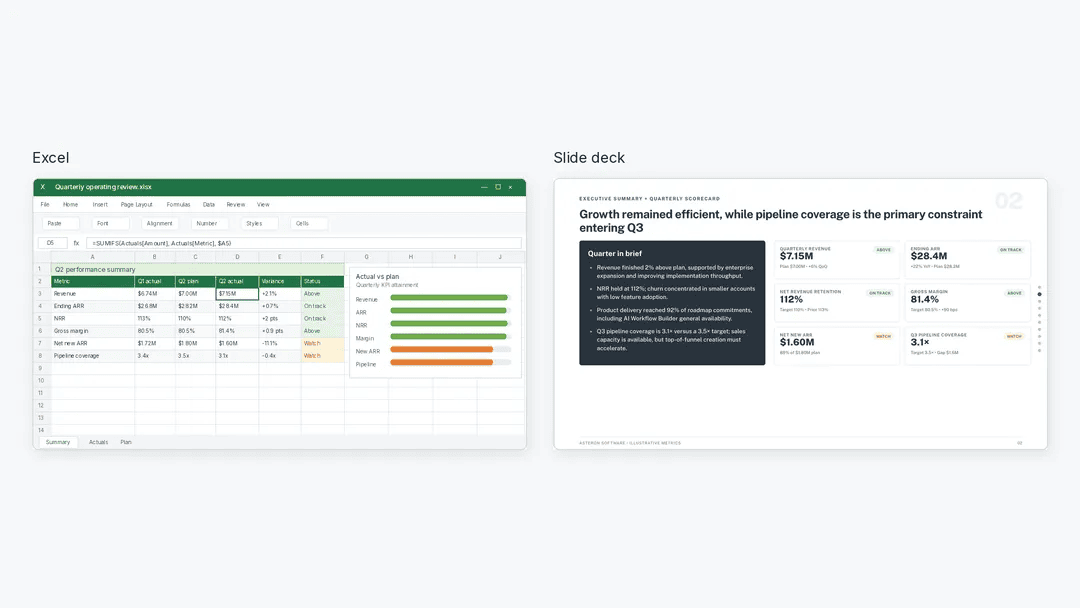
In the modern corporate landscape, the transition from raw data to a persuasive boardroom presentation is often where productivity grinds to a halt. Analysts frequently spend more time wrestling with formatting, chart selection, and slide narrative than they do performing the actual analysis. However, a new paradigm is emerging: the integration of Artificial Intelligence tools, such as Julius AI, to bridge the gap between complex Excel workbooks and polished, stakeholder-ready PowerPoint decks.
By shifting from manual slide creation to a structured, AI-assisted workflow, professionals can ensure that their presentations are not only aesthetically pleasing but also grounded in verifiable, accurate data.
The Core Challenge: Data Integrity in Automation
The primary risk when using AI for business reporting is the "black box" phenomenon—the tendency to trust automated outputs without verifying the underlying math. To mitigate this, experts recommend a deliberate, step-by-step approach. Rather than tasking an AI with "creating a presentation" in one go, users should treat the process as a data-validation pipeline.
Establishing the Objective
Before a single slide is drafted, the analyst must define the narrative. A presentation titled "Marketing Performance Review" is too broad to be useful. Instead, the focus should be on answering specific leadership questions. For instance: How did revenue change last quarter, and what factors should inform our budget allocation for the next quarter?
By centering the analysis on a business decision, the resulting slides become actionable insights rather than static displays of vanity metrics.
Chronology of an AI-Augmented Workflow
To successfully leverage AI tools like Julius for reporting, one must follow a disciplined, five-stage process. This chronology ensures that the AI functions as an analyst’s assistant, not a replacement for human judgment.
1. Preparation and Data Hygiene
Before uploading a file, it is critical to sanitize the workbook. This includes separating "Source Data" from "Check Calculations." Keeping reference results in a distinct tab allows the AI to perform verification without confusing internal reference points with raw input.
2. The Verification Phase
Never ask for a presentation immediately. Start by prompting the AI to inspect the data:
- Identify metadata: Confirm the reporting periods and currency units.
- Flag anomalies: Ask for missing values or duplicate records.
- Define terminology: Explicitly clarify what "revenue" means in the context of the business (e.g., booked revenue vs. cash collected).
3. Quantitative Analysis
Once the data is validated, move to the calculation phase. Request specific metrics—such as year-over-year revenue growth or return on ad spend (ROAS)—and demand that the AI show its formulas. This transparency is the key to accountability.
4. Briefing the AI for Visuals
Only after the numbers are locked and verified should the AI be tasked with visual creation. A well-constructed prompt at this stage acts as a "creative brief," defining the audience, the time limit of the presentation, and the specific limitations of the data.
5. The Final Audit
The final step is the human-in-the-loop review. The AI-generated deck is a draft. The analyst must verify that chart labels are accurate, source notes are present, and the narrative flow aligns with the data.
Supporting Data: A Case Study in Marketing Analysis
To illustrate this workflow, consider a quarterly review of marketing spend. Suppose an organization tracks revenue across three channels: Organic Search, Paid Search, and Partners.
| Channel | Q1 Revenue | Q2 Revenue | Change |
|---|---|---|---|
| Organic Search | $100,000 | $150,000 | +50% |
| Paid Search | $150,000 | $180,000 | +20% |
| Partners | $50,000 | $30,000 | -40% |
| Total | $300,000 | $360,000 | +20% |
The "Hidden" Narrative
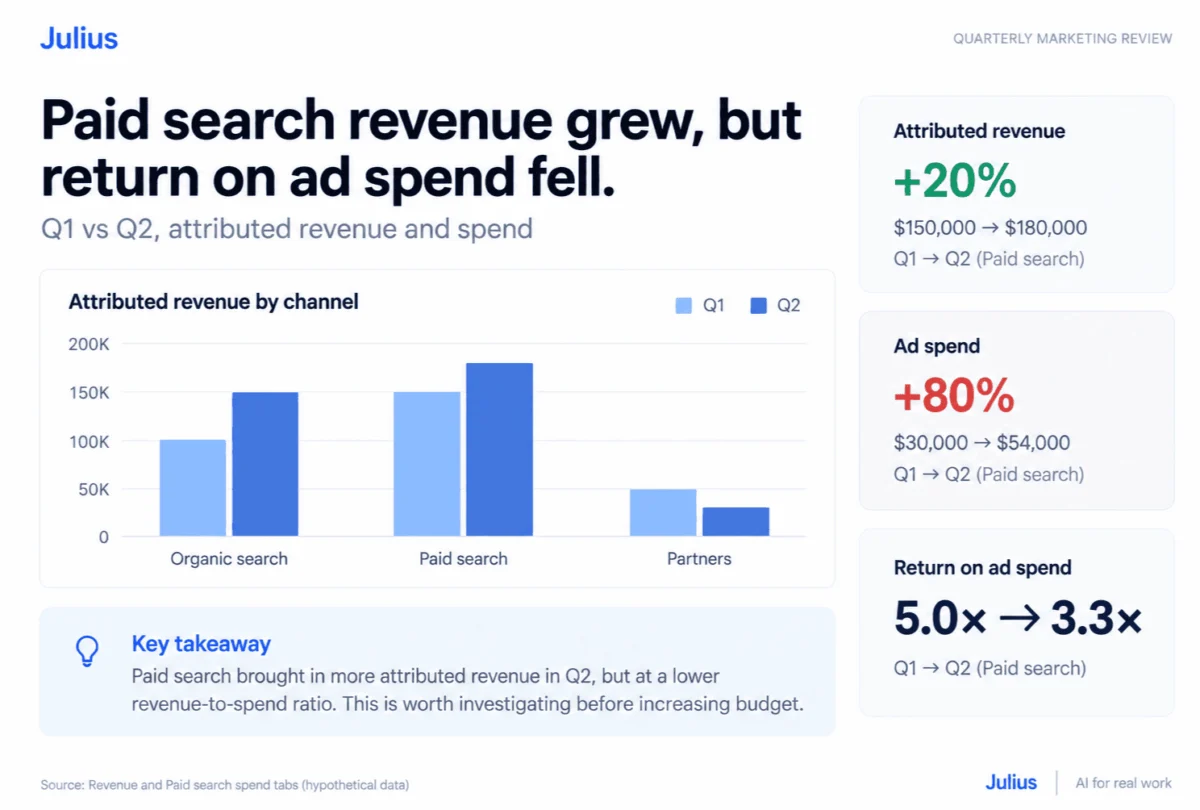
The data reveals a 20% total revenue increase, but a deeper look at Paid Search tells a more complex story. While revenue grew, Paid Search spend increased by 80% (from $30,000 to $54,000). Consequently, the Return on Ad Spend (ROAS) plummeted from 5.0x to 3.3x.
A standard presentation might focus solely on the 20% revenue growth, missing the critical insight that the company is paying significantly more to acquire that growth. This is where AI-driven analysis provides immense value: it highlights the necessity of the "Efficiency vs. Growth" conversation before the budget is finalized.
Official Perspectives on AI-Assisted Reporting
Industry leaders emphasize that while AI tools like the Julius presentation maker are sophisticated, they lack the contextual awareness of the business environment.
"The AI does not know that a partnership decline might be due to a specific contract renegotiation," says one industry analyst. "It sees the numbers, but it doesn’t see the strategy. Therefore, the AI’s role is to provide the ‘what,’ while the analyst provides the ‘why.’"
Official documentation from AI-integration providers reinforces this, noting that users should always perform an "independent verification" of any figures intended for executive consumption. The goal is not to automate the thinking process, but to automate the labor-intensive portion of the documentation process.
Implications for Corporate Efficiency
The shift toward AI-automated slide creation has profound implications for corporate productivity and decision-making speed.
Reducing "Slide Debt"
"Slide debt" refers to the accumulation of poorly formatted, inaccurate, or outdated slides that circulate within an organization. By using AI to create modular, editable decks, teams can reduce the time required for internal reporting by as much as 60-70%.
Enhancing Data Literacy
When analysts are forced to provide clear prompts and verify AI calculations, they inherently become more data-literate. They must understand the logic behind the formulas, ensuring that the insights presented to the leadership team are robust and defensible.
The Future of Executive Reporting
In the future, we can expect "Living Presentations"—decks that pull real-time data from CRM and ERP systems. When an executive asks, "What if we increase the budget for Paid Search by 10%?" the presentation will not just show static charts, but will offer dynamic projections based on the latest performance data.
Ethical Considerations
As we rely more on AI, there is an inherent responsibility to maintain data privacy. Users must ensure that sensitive customer information is anonymized before being processed by cloud-based AI tools. Furthermore, the "source tab" should always be clearly labeled in any output to ensure that the chain of custody for the data remains transparent.
Conclusion
The path from raw Excel spreadsheets to boardroom-ready presentations no longer needs to be a source of administrative frustration. By adopting a structured, verification-first workflow, professionals can harness the speed of AI while maintaining the rigor required for high-stakes business decisions.
Whether you are a marketing manager, a financial analyst, or a team lead, the key to successful AI adoption lies in the balance: let the machine handle the formatting and basic arithmetic, but keep the strategic narrative firmly in human hands. As these tools continue to evolve, those who master the art of the AI-driven brief will undoubtedly find themselves with more time to focus on the most important part of their job: the actual strategy.