Adobe has officially unveiled a comprehensive suite of updates for Photoshop, marking a pivotal shift in how the industry-standard software balances complex professional requirements with the rising demand for intuitive, AI-driven accessibility. By introducing the "AI Assisted Editor" and a host of sophisticated generative tools, Adobe is effectively lowering the barrier to entry for novices while simultaneously streamlining the "concept-to-completion" pipeline for seasoned industry veterans.
Main Facts: The New Photoshop Landscape
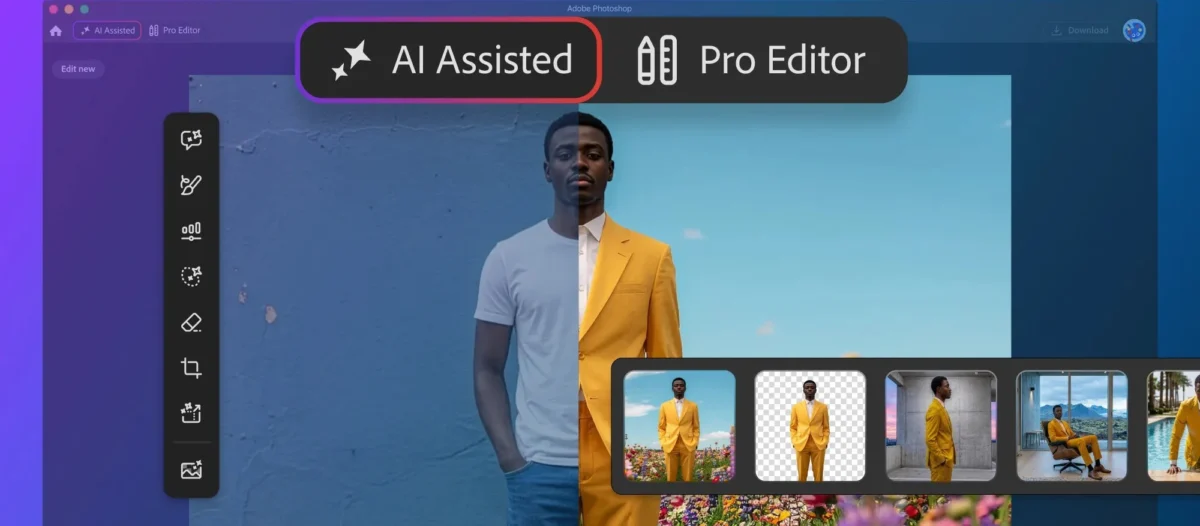
On Thursday, Adobe announced a series of significant updates to its flagship image-editing software, Photoshop. The most notable addition is the AI Assisted Editor, a beta feature that offers a streamlined, prompt-based interface. This mode stands in contrast to the traditional "Pro Editor" view, which remains the cornerstone for high-end graphic design and photo manipulation.
Beyond the interface overhaul, the update introduces Prompt to Edit, which allows for global image modifications—such as weather changes or environmental shifts—via natural language. Complementing this is Instruct Edit with Masks, powered by the new Firefly Image 5 model, which enables users to isolate specific areas for AI-driven transformation without disturbing the rest of the composition.
Rounding out the release are technical improvements, including a "Light Adjustment Layer" for non-destructive lighting control, a massive expansion of the Adobe Stock integration, and a new "Markup" tool that allows users to guide AI by literally drawing on their canvas.
Chronology: The Evolution Toward Generative Integration
To understand the weight of these updates, one must look at Adobe’s trajectory over the past two years. Since the integration of Firefly, Adobe has been moving away from a tool-centric model toward a "co-pilot" model.
- Early 2023: Adobe introduced the first iteration of Generative Fill, signaling the company’s commitment to integrating generative AI directly into the Creative Cloud workflow.
- Late 2023 – Mid 2024: Adobe focused on stability and legal compliance, ensuring their AI models were trained on ethically sourced stock imagery, differentiating them from competitors in the generative space.
- August 2026 (The Current Announcement): Adobe pivots from merely "adding AI features" to "reimagining the workspace." The introduction of the AI Assisted Editor represents the first time the interface itself has been bifurcated to cater to different user profiles.
- Future Outlook: Industry analysts suggest that this modular approach to the Photoshop UI is a precursor to a fully adaptive, context-aware interface that changes based on the user’s specific project goals.
Supporting Data: Why the AI-Assisted Shift Matters
Adobe’s internal research suggests a growing "usability gap" among its user base. While Photoshop remains the gold standard, its vast array of thousands of tools, menus, and sub-menus can be daunting.
The Efficiency Metric
The AI Assisted Editor is designed to reduce the time spent on "mechanical" tasks. According to early beta testing feedback, users tasked with simple background removal or basic conceptual mockups saw a 40-60% reduction in time-to-completion when using the new interface compared to the traditional Pro Editor.
The Scale of Adobe Stock
The integration of a dockable Adobe Stock panel provides instant, in-app access to over 900 million assets. By linking these directly to the AI engine, users can now drag-and-drop assets and immediately apply generative transformations, effectively creating a "closed-loop" production environment that prevents users from ever needing to leave the Photoshop window to hunt for stock photos or assets.
Official Responses and Strategic Vision
In an official blog post, Adobe’s product team emphasized that the goal is "choice and control." The sentiment from the company is clear: they do not want to replace the professional designer, but rather "de-skill the friction" associated with repetitive technical tasks.
"We recognize that not every edit requires the full weight of a professional workspace," an Adobe spokesperson noted. "By introducing the AI Assisted Editor, we are empowering creators to experiment, ideate, and iterate at the speed of thought. Meanwhile, our Pro Editor mode remains untouched, ensuring that the granular control our professional users rely on is never compromised."
The inclusion of the "Markup" tool was specifically requested by professional photographers and art directors who felt that text prompts alone were too imprecise for high-stakes commercial work. By allowing a user to draw a circle around a specific subject and instruct the AI to "recolor this," Adobe is bridging the gap between human intuition and machine-learning precision.
Implications: A New Era for Creative Professionals
The implications of this update are profound for both the freelance community and large-scale creative agencies.
For the Novice
The AI Assisted Editor acts as a "gateway" into the professional world. By providing a prompt-based interface that mirrors the simplicity of apps like Firefly, Adobe is ensuring that the next generation of creators begins their journey within the Adobe ecosystem rather than gravitating toward simpler, non-professional mobile tools.
For the Professional
The impact on the professional workflow is more nuanced. The "Prompt to Edit" and "Instruct Edit with Masks" tools allow for rapid prototyping. Art directors can now present multiple variations of an image to a client in minutes rather than hours. The non-destructive "Light Adjustment Layer" also ensures that even when using AI tools, the professional retains the ability to tweak exposure, contrast, and shadows in a way that respects color-managed workflows.
The "Markup" Paradigm Shift
Perhaps the most significant implication is the shift toward multi-modal interaction. The ability to use a stylus or mouse to "mark up" an image—essentially drawing directions for the AI—marks a shift away from pure text-to-image and toward "human-in-the-loop" generative editing. This gives the artist back the authority, positioning the AI as a technician executing a vision rather than an autonomous creator.
Addressing the Professional Critique
Some professionals have expressed concerns that "AI-assisted" modes might lead to a dilution of skill. However, the modular nature of this update—specifically the ability to hide the AI Assisted mode and stick to the Pro Editor—demonstrates that Adobe understands the sanctity of the professional toolset. The update is additive, not subtractive; it provides a specialized tool for the "ideation phase" while keeping the "production phase" firmly in the hands of the human expert.
Technical Deep Dive: Under the Hood
The technical backbone of these updates is the Firefly Image 5 model. Unlike previous iterations, Image 5 has been optimized for "local awareness."
- Dynamic Text, Shapes, and Paths: This update utilizes real-time vector path generation. By adapting text along curves automatically, the software removes the tedious manual alignment processes that have existed since the early 2000s.
- Non-Destructive Light Adjustment: By treating lighting as a layer, Photoshop can now interpret the 3D depth of an image to apply light falloff more realistically. This is a significant leap forward from simple global brightness filters.
- Instruct Edit with Masks: This feature leverages high-fidelity segmentation algorithms to ensure that the "instruction" (e.g., "change the color of the shirt") does not bleed into the skin tones or background textures, a common pain point in early generative models.
Conclusion: The Path Forward
Adobe’s latest Photoshop update is more than a collection of new features; it is a strategic maneuver designed to future-proof the software against a rapidly evolving technological landscape. By successfully integrating generative AI into both the novice and professional workflows, Adobe is positioning itself as the indispensable bridge between human imagination and digital execution.
As the industry continues to grapple with the role of AI in creative work, Adobe’s focus on "control" and "non-destructive, professional-grade" output provides a reassuring roadmap. Whether it is a professional photographer adjusting lighting on a high-fashion shoot or a social media manager quickly swapping out a background for a new campaign, the new Photoshop is clearly designed to handle both with equal competence.
For the creative industry, the message is clear: the tools are changing, but the necessity for human direction, artistic intent, and professional discernment has never been higher. Adobe is simply ensuring that when the human has a vision, the software is now faster, smarter, and more responsive than ever before.