
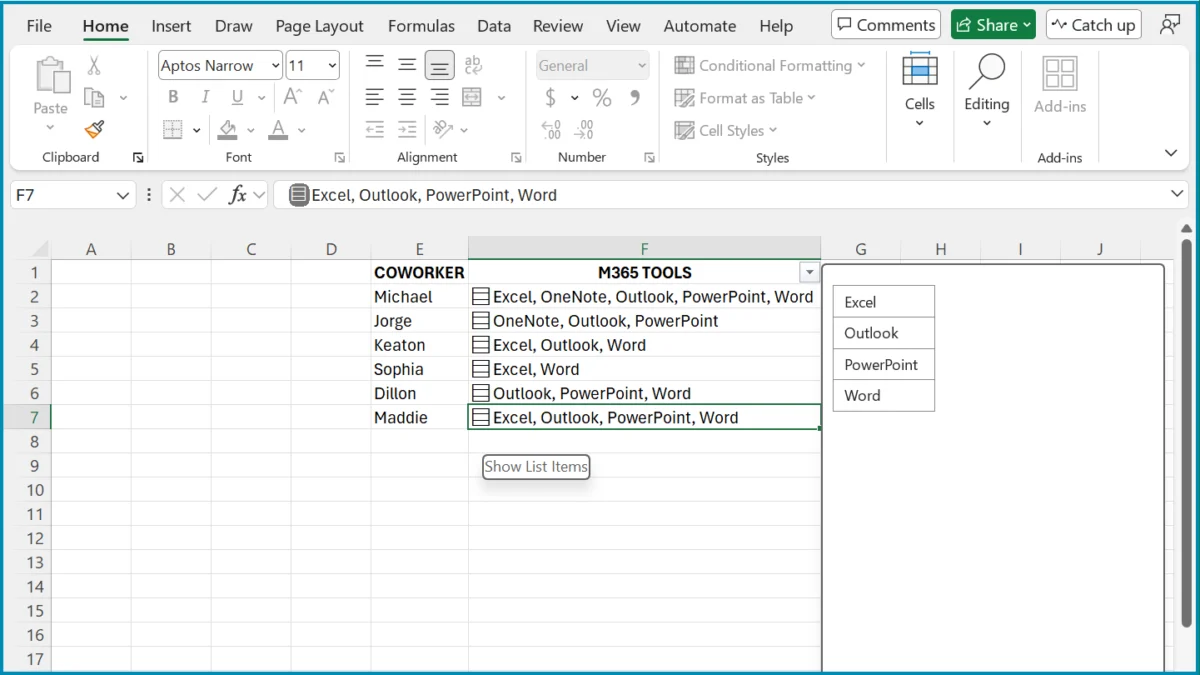
For decades, the fundamental architecture of Microsoft Excel has remained anchored to a rigid, two-dimensional grid. Every intersection of a row and column—the humble cell—has been defined by a singular, immutable rule: one cell, one value. Whether you were inputting a date, a currency figure, or a line of text, the cell acted as an isolated container. While workarounds like concatenating strings with commas or utilizing dynamic array formulas to "spill" data across the worksheet have long existed, the underlying container itself remained restricted to a scalar format.
Microsoft is now poised to shatter that convention. In a significant evolution for the world’s most popular spreadsheet application, the company has begun previewing a feature that allows users to store multiple, structured values directly within a single cell. This shift, currently available to select Microsoft 365 Insider participants, represents one of the most profound changes to Excel’s data management capabilities since the introduction of the modern formula engine.
The Mechanics of Multi-Value Cells
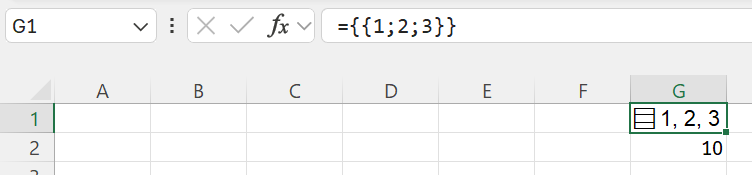
The core of this update lies in the introduction of three distinct, structured data types that can now reside within the confines of a single spreadsheet cell. This is not merely a cosmetic change; it is a fundamental shift in how Excel interprets, stores, and processes data. By allowing lists and nested arrays to exist as singular entities, Microsoft is effectively turning every cell into a miniature database object.
The New Data Structures
At the heart of this feature are three specific structures:

- In-Cell Lists: A collection of items that maintains its own internal logic, allowing users to bundle disparate values without resorting to hidden columns or convoluted string concatenation.
- Nested Arrays: This allows for multi-dimensional data to be packed into a single container, facilitating complex calculations without the risk of "spilling" into neighboring cells.
- Structured Records: Advanced users can now store key-value pairs within a cell, allowing for more intuitive data lookups and organized information management.
These structures are designed to streamline workflows that were previously hindered by the "one-cell, one-value" limitation. By reducing the reliance on horizontal sprawl, these features promise to make spreadsheets more readable, more efficient, and significantly easier to maintain.
A Chronology of Excel’s Evolution
To understand the significance of this update, one must look at the trajectory of Excel over the last several years.
- The Early Years (1985–2010): Excel was a calculator. Data was static, and formulas were largely limited to cell-by-cell calculations. The "spill" concept did not exist; if a formula required an array, it had to be wrapped in specialized, often obscure syntax (Ctrl+Shift+Enter).
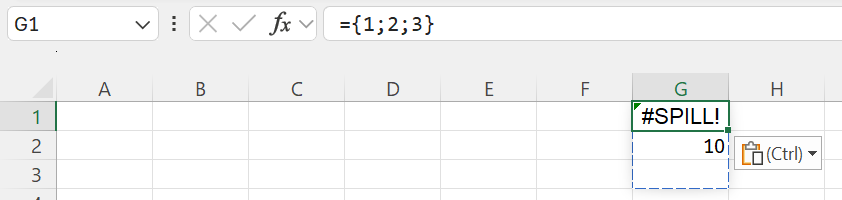
- The Dynamic Array Era (2018–2022): Microsoft introduced Dynamic Arrays, a revolutionary change that allowed formulas to return multiple results that "spill" into adjacent cells. This was a massive productivity boost, but it brought with it the notorious
#SPILL!error—a frustration that occurred whenever a formula’s output path was blocked by existing data. - The Modern Data Era (2023–Present): Microsoft began integrating richer data types, such as Stock and Geography types. These paved the way for the current "multi-value" experiment, moving Excel closer to a true relational database tool.
Supporting Data and Real-World Use Cases
The implementation of these structures is not purely theoretical; it addresses tangible friction points that power users and data analysts encounter daily.
1. Advanced Categorization
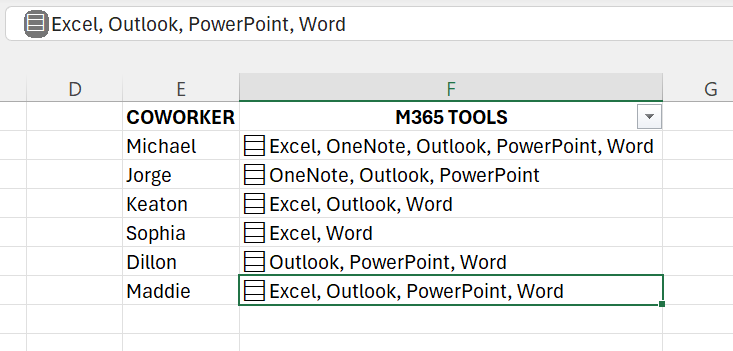
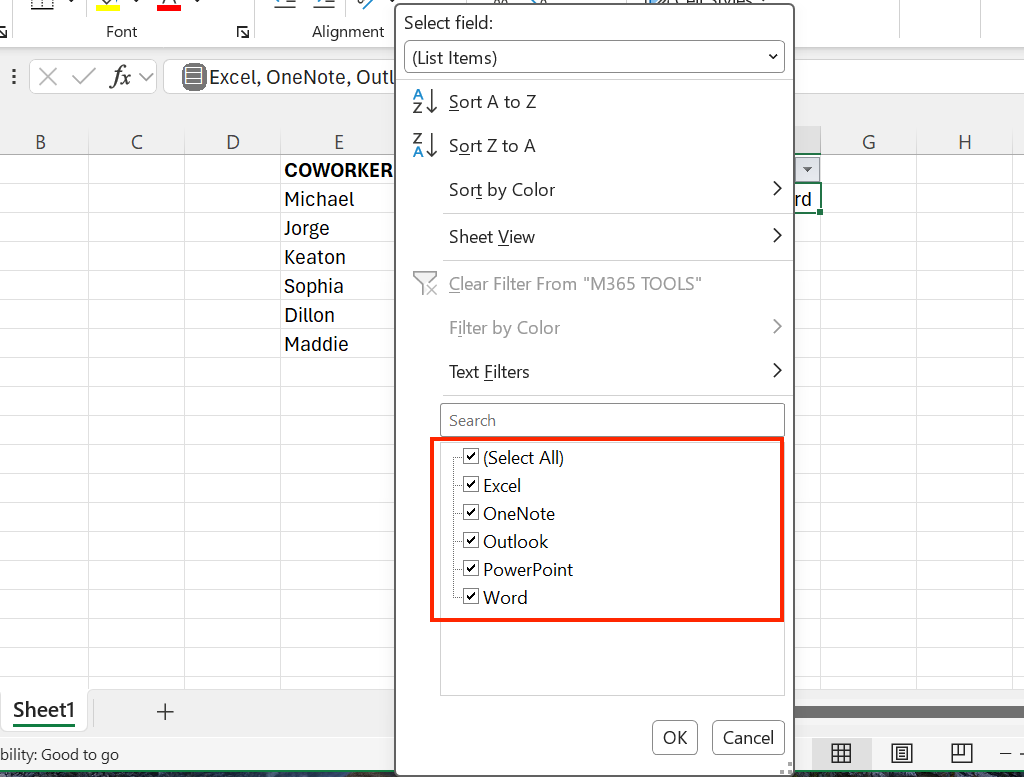
Consider a human resources spreadsheet tracking employee expertise. In the traditional model, a project manager might have five columns dedicated to software proficiency (Excel, OneNote, Outlook, PowerPoint, Word). This makes the sheet horizontally bloated. With in-cell lists, all five proficiencies can be packed into a single cell. Crucially, Excel retains the ability to treat these items individually, allowing for granular filtering at the click of a button.
2. Survey and Sentiment Analysis
Researchers often struggle with survey data where a single respondent provides multiple answers to a single question. Historically, this required "flattening" the data or creating complex lookup tables. Now, all responses can be stored in a single cell, keeping the source data clean and the analysis logic centralized.
3. Ending the #SPILL! Nightmare
Perhaps the most welcome change for formula enthusiasts is the mitigation of the #SPILL! error. By packing split outputs—using functions like TEXTSPLIT—into a single-column result that holds data internally, users no longer need to worry about clearing out the rows below their formulas. The result is contained, clean, and highly portable.
Official Responses and Availability
Microsoft has approached this rollout with caution. As of now, the features are restricted to the Microsoft 365 Insider program (Beta Channel) on Windows and Mac.
"We are listening to feedback," a spokesperson for the Excel engineering team noted in recent documentation. "The goal is to provide more power to the end-user while maintaining the stability and ease-of-use that defines the Excel experience."
It is important to note that these features are currently not supported in perpetual license versions (such as Office 2021 or 2024) or the web version of Excel. This suggests that the feature relies on the heavy processing power of the desktop client and may require significant updates to the underlying file format (OpenXML) before a wider release can occur.
Implications for the Future of Data Analysis
The implications of this update are far-reaching, potentially changing how businesses perceive Excel.
Enhanced Data Integrity
By moving toward structured, in-cell data, Excel is effectively reducing the risk of human error. When data is contained within a single cell, there is less chance of accidentally deleting a column or misaligning a row during a sorting operation. This "object-oriented" approach to cells makes spreadsheets more robust.
The Learning Curve
However, there is a cost. The introduction of these features adds a layer of complexity for casual users. Understanding how to "unpack" an array or navigate a list requires a shift in mindset. When a standard formula references a cell containing one of these structures, it will automatically "spill" its contents. Users will need to learn to utilize functions like INDEX or field access operators to interact with this data without breaking their sheet layout.
A New Standard for Collaboration
In a collaborative environment, consistency is key. If a team is using different versions of Excel, files containing these new data structures may appear broken or display errors to those on older versions of the software. Organizations will need to ensure that their workforce is upgraded before these structures can be used as a standard for data sharing.
Potential Caveats and Future Risks
As with any feature in the Beta stage, there are risks. Microsoft has explicitly warned that the behavior, syntax, and storage methods for these structures are subject to change. Power users who start building complex models today may find that their formulas require refactoring once the feature reaches general availability.
Furthermore, the performance impact of high-density nested arrays is still being studied. Large-scale spreadsheets that utilize these structures throughout thousands of rows could potentially see a degradation in recalculation speed. Users are encouraged to provide feedback through the "Tell Us What You Think" feature in Excel to help the engineering team optimize performance.
Final Thoughts: A New Chapter for Spreadsheets
Microsoft Excel has survived for nearly forty years by balancing the needs of the casual user with the demands of the data scientist. The introduction of in-cell data structures is the latest chapter in that balance. By allowing the humble cell to hold more than just a single scalar value, Microsoft is acknowledging that the nature of data has changed. We no longer live in a world of simple lists; we live in a world of complex, nested, and relational data.
While the "one cell, one value" rule has served as a reliable foundation for decades, its retirement marks the beginning of a more flexible, powerful, and modern era for spreadsheet computing. Whether this leads to a new golden age of productivity or a more complex learning curve for the average user remains to be seen—but for now, the grid has officially gained a new dimension.