In an era defined by the rapid encroachment of generative artificial intelligence and the promise of "smart" automated assistants, it is easy to overlook the foundational tools that have long powered the modern digital workspace. While Google continues to roll out sophisticated AI-driven features like the Gemini-powered "AI Inbox," many power users find that the most effective way to manage a deluge of incoming mail isn’t by letting an algorithm guess their intent, but by taking the reins themselves.
Gmail’s filter system—a robust, rule-based architecture—remains the gold standard for inbox management. Far from being a relic of the early web, these filters offer a level of precision and reliability that contemporary, opaque AI systems often fail to match. By mastering the art of the custom filter, you can transform your inbox from a chaotic repository of distractions into a well-oiled machine that works exclusively for you.
The Core Philosophy: Control Over Convenience
The fundamental appeal of Gmail filters lies in their transparency and predictability. Unlike AI-driven sorting, which can be prone to "hallucinations" or misinterpretations of your personal priorities, a filter operates on binary, user-defined logic. When a message hits your server, the filter evaluates it against your criteria. If it matches, it acts. There is no guessing, no probabilistic modeling, and no risk of a machine deciding that an urgent client email belongs in the "Promotions" tab.
Moreover, because these filters exist at the server level, they operate entirely within your control. You are not feeding your personal data into a generative model to "train" it; you are simply defining the workflow of your own digital workspace. This is not just a matter of efficiency; it is a matter of digital sovereignty.

A Brief Chronology of Gmail Automation
Gmail’s filter system was introduced during the service’s infancy, long before the integration of sophisticated machine learning.
- 2004–2006 (The Foundation): Gmail launched with the revolutionary concept of "labels" rather than traditional folders. Filters were introduced shortly thereafter, allowing users to move messages from the Inbox directly to labels, effectively inventing the modern "Inbox Zero" workflow.
- 2010–2015 (Refinement): As Gmail grew, Google added advanced search operators (like
has:attachmentorfrom:domain.com), which became the backbone of the filter creation process. - 2019–2023 (The AI Pivot): Google began aggressively pushing AI-based categories (Primary, Social, Promotions). While helpful for the average user, these automated categories often frustrated power users who preferred granular control.
- 2026 (The Current Landscape): In the face of increasingly complex AI tools, there has been a resurgence in interest regarding "classic" productivity hacks. Today, users are rediscovering that the most "intelligent" way to manage email is to combine the search power of 2015 with the refined interface of 2026.
Supporting Data: The Case for Automation
Studies on workplace productivity consistently show that "context switching"—the act of stopping one task to address a distracting email—can reduce cognitive output by as much as 40%. By utilizing filters to automatically sort, archive, or highlight high-priority communications, users can create a "batching" workflow.
Instead of reacting to every notification, a user can configure filters to:
- Bypass the Inbox: Automatically archive newsletters or automated system alerts, moving them to a "Read Later" label.
- Highlight Urgency: Use a filter to star or mark as "Important" any email containing specific keywords from high-priority contacts.
- Prevent Clutter: Automatically delete specific recurring notifications that have no long-term value.
By reducing the visual noise of the inbox, users report higher levels of focus and a significant reduction in "email fatigue."

Implementing Your Custom Filter Strategy
To harness the full power of Gmail, you must move beyond the basic "Search" function and utilize the Filter creation tool located in the desktop browser version of Gmail.
Step 1: The Search Box Strategy
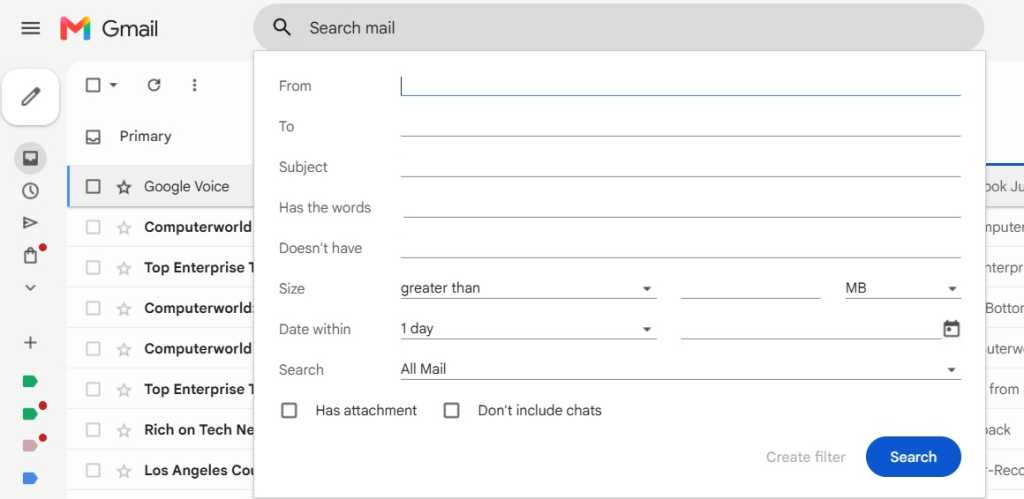
Navigate to the top of your Gmail window and click the "Show search options" icon (the three horizontal lines). This is the control center for your automation. Here, you can define:
- From/To: Pinpoint specific senders or domains.
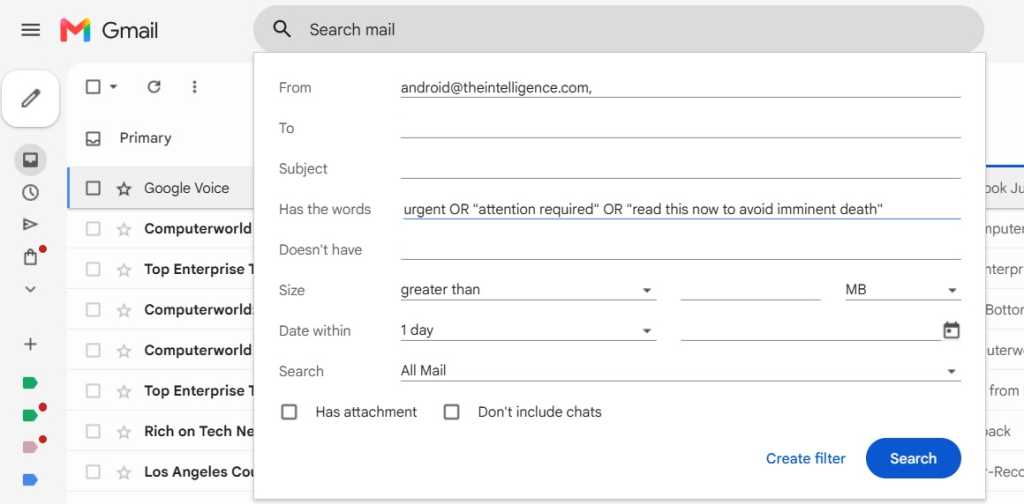
- Subject/Has the words: Utilize boolean logic. For example, using the command
(Invoice OR Receipt) AND (March OR April)allows you to capture specific financial documents with surgical precision. - Size/Date: Filter out massive attachments or emails older than a certain timeframe to manage storage space.
Step 2: Defining the Action
Once you have defined your criteria, click "Create filter." You will be presented with a list of actions. The most common include:
- Skip the Inbox (Archive it): Keeps your primary workspace clean.
- Apply the label: Immediately sorts the mail into a relevant project or client folder.
- Star it: Ensures that critical items are visually flagged the moment they arrive.
- Never send it to Spam: A crucial fail-safe for newsletters or automated reports that Gmail’s default algorithms might accidentally misidentify as junk.
Step 3: Retroactive Application
One of the most powerful—and often overlooked—options is the "Also apply filter to matching conversations" checkbox. By selecting this, you can instantly organize years of accumulated clutter in a matter of seconds, cleaning up your digital archives as effectively as you are organizing your future incoming mail.
Implications for the Modern Professional
The rise of AI-driven productivity tools has created a "black box" problem. When an AI tool moves your email, you often don’t know why. If it makes a mistake, it can take days to notice that a crucial communication was buried in a folder you rarely check.
By relying on manual, rule-based filters, you maintain a "glass box" system. You know exactly why an email landed where it did, because you wrote the rule that put it there. This creates a psychological sense of agency that AI currently cannot replicate.
Furthermore, as businesses become more reliant on automated notifications from project management software (like Jira, Asana, or Trello), the ability to filter these updates into distinct labels—rather than letting them clutter the primary inbox—has become a prerequisite for professional success.
Conclusion: The Well-Oiled Machine
Gmail filters are not just a way to save time; they are a way to reclaim your attention. While the tech industry is currently obsessed with the promise of AI agents that will do our thinking for us, the most effective tool in your kit remains your own logic.
By dedicating thirty minutes to audit your inbox, identify your most frequent sources of clutter, and construct a series of robust filters, you can move away from being a passive recipient of incoming data and toward becoming an active manager of your information flow.
As we look toward the future of digital communication, the lesson remains clear: the best technology is that which stays out of the way, executes its function reliably, and leaves the user in complete command. Your inbox is a reflection of your priorities—ensure that it is configured to reflect yours, not an algorithm’s.